
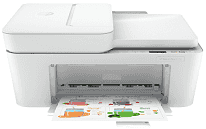
HP DeskJet 4175e Driver lets your computer communicate properly with the printer for everyday printing, scanning, copying, and faxing. During setup, it helps the operating system recognize the device over either a USB connection or a wireless network. Once paired, print and scan jobs move reliably between the computer and the printer. That steady communication helps reduce connection problems and keeps routine document work running smoothly.
HP DeskJet 4175e Drivers for Windows
6d7d65d371bec223970b3368ccfb0478835b1519751a73615bda3f71a52ea53983d239d64aa753b224ac1a5c229527fba7a264eb3653fb95af54a387b27b3b1b83d239d64aa753b224ac1a5c229527fba7a264eb3653fb95af54a387b27b3b1bHP DeskJet 4175e Specifications
The HP DeskJet 4175e brings together printing, scanning, copying, and mobile fax functions in one compact inkjet unit. Printing comes from HP Thermal Inkjet technology using separate black and tri-color cartridges. Scanning relies on a flatbed plus a 35-sheet automatic document feeder, making multi-page originals easier to process than the glass alone. A small monochrome LCD and physical buttons handle everyday controls. A computer can connect through Hi-Speed USB 2.0, or jobs can travel over the built-in dual-band Wi-Fi network.
Black pages print at ISO speeds of up to 8.5 pages per minute, with color output reaching up to 5.5 pages per minute. Black text is produced at up to 1200 x 1200 rendered dpi. Color documents can reach up to 4800 x 1200 optimized dpi when printing from a computer onto supported HP photo paper. The scanner captures originals at an optical resolution of 1200 dpi, and the flatbed takes documents up to 216 x 297 mm. For two-sided documents, the driver guides manual duplex printing because automatic duplex hardware is not installed.
The rear input tray holds up to 60 sheets for everyday jobs. Above it, the document feeder accepts as many as 35 sheets when scanning or copying several pages in one run. Letter and A4 paper share the same feed with smaller photo sizes. Envelopes and selected specialty media also use that path. Borderless output is not available, so full-bleed photo printing is outside the design of this model.
Wireless jobs work with Apple AirPrint, Mopria, ChromeOS, and the HP app. HP does not list Wi-Fi Direct support for this printer, so wireless printing normally depends on the local network. The monthly duty cycle reaches up to 1,000 pages, although HP recommends a lighter routine workload for regular use. With the trays closed, the body measures about 428 x 332 x 200 mm and weighs approximately 4.82 kg. Ethernet, memory-card slots, and a touchscreen are not part of the hardware.
Technical Details
| Title | HP DeskJet 4175e Drivers |
|---|---|
| Device Type | All-in-one printer |
| Driver Version | Varies by driver and operating system |
| Available Downloads | Drivers |
| License | Free |
| Manufacturer | HP Inc. |