
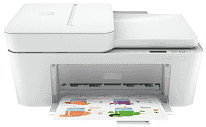
The HP DeskJet 4100e Driver gives a computer the files it needs to set up this all-in-one printer correctly. Once installed, the computer can send print jobs and use the scanner instead of seeing the machine as an unknown USB or wireless device. Copying stays on the printer itself, but the same installation still matters for full device recognition. For scans, the driver helps the computer receive pages from the flatbed or scanner path without mixing the printer with a basic print-only queue.
HP DeskJet 4100e Drivers for Windows
6d7d65d371bec223970b3368ccfb0478835b1519751a73615bda3f71a52ea53983d239d64aa753b224ac1a5c229527fba7a264eb3653fb95af54a387b27b3b1b83d239d64aa753b224ac1a5c229527fba7a264eb3653fb95af54a387b27b3b1bHP DeskJet 4100e Specifications
The HP DeskJet 4100e is a color inkjet all-in-one in HP’s DeskJet 4100e series, built for printing, scanning, and copying from a small desktop body. Its print engine uses drop-on-demand thermal inkjet hardware with PCL3 GUI language support. A display-icon control panel sits on the top panel for basic local status and commands. Multipage originals can move through the 35-sheet automatic document feeder. For bound pages or single originals, the glass remains the better path.
Black printing reaches up to 8.5 pages per minute, so larger jobs will not move like an office laser machine. Actual speed still depends on document detail and the selected output setting. Scanning reaches up to 1200 dpi optical resolution from either the flatbed glass or the ADF path. Color scans record 24-bit data. Grayscale scans use 8-bit output with 256 gray levels, enough for ordinary document copies and simple archive work. The scan area is 21.6 x 29.7 cm, and copy output comes from digital image processing.
Paper loads from a 60-sheet input tray when using 75 g/m² plain paper. That capacity suits short home or student jobs better than long unattended runs. The same feed takes small batches of envelopes, index cards, or photo sheets, but those loads stay much lower than plain paper. Printed plain sheets collect in a 25-sheet output tray. Envelopes, cards, and photo paper have smaller output limits, so mixed media jobs need closer attention. Plain paper ranges from 60 to 90 g/m², while cards can reach 200 g/m².
Wireless jobs can travel over dual-band Wi-Fi, and the self-reset function helps the printer recover from some network interruptions. Wi-Fi Direct gives another route when a router connection is not available. A nearby computer can still use USB, with HP recommending a cable no longer than 3 m. Mobile printing depends on HP Smart app workflows and an online printer connection. Indoors, the listed operating range is 15°C to 30°C, with 20 to 80% non-condensing humidity.
Technical Details
| Title | HP DeskJet 4100e Drivers |
|---|---|
| Device Type | All-in-one printer |
| Driver Version | Varies by driver and operating system |
| Available Downloads | Drivers |
| License | Free |
| Manufacturer | HP Inc. |