
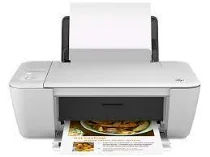
The HP Deskjet 1513 printer is a multifunction printer for printing, copying, and scanning documents. This printer is also known as an All-in-One printer. With this all-in-one printer, users efficiently perform functions of a multifunction color photo printer with a scanner and copier of documents, such as copying, scanning, and printing. The setup of this printer is effortless and quick. The printer is compact and saves space at home or in offices. The HP Deskjet 1513 printer supports HP GUI language. This printer has a monthly duty cycle of 1000 pages.
HP Deskjet 1513 Drivers for Windows
72c4eb5aa491f71c7eb6951bc6f6d8d1cd753f0371e144c347e7eb6cff7d8ddbad127c67102525dafd5403742cb25f13b0fc1241667207926d69c4935226a3c2373c2410b5f0eeb19bbd5bc22205e836bf29edd8676a73f6b75090c97541685fHP Deskjet 1513 Drivers for macOS
99e1d18847c64a405486ae34424f0a1c8d89920d17df86c45b6b0007f101d70a1e8deecc0d7c3ea1c272f63df7bece763eb75f6656551a5f6b6e4da2f6b97f6aHP Deskjet 1513 Deskjet 1513 All-in-One Printer Cartridges
HP 61 Black Ink Cartridge (~190 pages), HP 61 Tri-color Ink Cartridge (~165 pages)
Specifications
The HP Deskjet 1513 printer supports the various standards of paper handling such as a 60-sheet input tray and a 25-sheet output tray. The All-in-one printer endorses the different sizes of media such as letter, legal, 4×6-inch, 5×7-inch, and No. 10 envelopes and many others. The printer unit dimensions are approximately 6.14×16.75×12 inches.
This printer easily supports various media types such as Paper (brochure, inkjet, plain), Photo paper, Envelopes, Labels and Cards (greeting). The HP Deskjet 1513 printer is easily compatible with USB 2.0. This printer uses an HP 61 Black ink cartridge and Tri-color ink cartridge. The HP Deskjet 1513 printer is easily compatible with various operating systems such as Windows 8, Windows 7, Windows Vista, Windows XP and Mac OS with better hard disc space. This printer includes a USB port and power outlet.
The printer uses HP thermal inkjet technology with a high print speed for black printing of 20 ppm (pages per minute). The color print speed is 16 ppm (pages per minute). The HP Deskjet 1513 has print quality measured in dots per inch for black & white and color. The print quality of black is up to 600×600 dpi and the print quality of color is up to 4800×1200 dpi.
The copy speed of black pages is 4.5 cpm (copies per minute), and the speed of color pages is up to 3 cpm (copies per minute). The resolution of black pages in copying is up to 600×300 dpi and the resolution of text and graphics pages is up to 600×300 dpi. The HP Deskjet 1513 printer copies a maximum of 9 copies. With this printer, the user efficiently uses digital image processing. The HP Deskjet 1513 printer prints, copies and scans documents in a single device. This printer is used for a full range of requirements such as scanning documents, copying documents and printing any soft copy documents.
The HP Deskjet 1513 printer is the best option for scanning documents with high-quality resolutions. The printer scans documents with high resolution up to 1200×1200 ppi. Scanning documents requires 24-bit color and 8-bit grayscale with 256 levels of gray color. The HP Deskjet 1513 printer produces documents of the best size with a maximum scan size from glass of 21.6×29.7 cm (8.5×11.7 inches). This printer can be used for different purposes, such as scanning, copying and printing documents.
Technical Details
| Title | HP Deskjet 1513 Drivers |
|---|---|
| Device Type | All-in-one printer |
| Driver Version | Varies by driver and operating system |
| Available Downloads | Drivers |
| License | Free |
| Manufacturer | HP Inc. |