
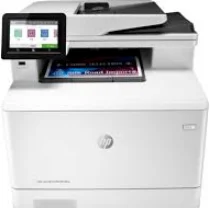
HP Color LaserJet Pro MFP M479fnw model is a multifunction printer with the ability to print, copy, scan, fax, and send an email. It takes about 9.5 seconds to produce the first black page on A4 paper at the ready mode. After the first page, the subsequent pages print at 27 pages per minute (ppm) for black and color documents. Here you can download the HP Color LaserJet Pro MFP M479fnw driver supported on Windows and mac OS.
HP Color LaserJet Pro MFP M479fnw Drivers for Windows
667df4c8a59aca76a8122fb7a0bdc3dd850fb1971f89cb08286edc4ed3f024cfcd5191f2cc780f712921a15348ad22b692345be5054b3c0322d95f0a1631ae82d49c509b22374a12825a74c8e94abdf315689b758ff0f492431dae13d0ad64c8558d6155aa58458f051b324031b7a876f0f593b83c6456459c605e19fe8fe960032f0408ada3363a3a0e2f4cc3e9090cad5ba321488abea61b126af9447eaedcf553ab1ed9b53b813cf4479bcbf64da595ae91b75188fe9e0c5d23131da58ef8295e4df666fa875808094cc76ae55c09d48cde9bf03432f7eef7830896974bb6c579f0c3e2b15c2cf0ca01a4e202172c2cb8c6cb03bda45aed2d6b0f4af517a994fb9f4a832efdd01ffc16af784c0ad85289fe87d75d0de11ff322566145eec8f60f54f607e9fd0d98b991b0f273a370b1c1112f794d818060416b2a65cf1f9256a177a1871b207548b705683228aa1673d266d2a663ddfa94f7022a12b390b6d2f18088da8df16f0017983756626431eeeeddb0e386dd19a223c89e5a6a9c4fce728403422ec1c590fb971561abec94e476484815326373058a39afd61bccc2cc5c7d9a9f83c8f0133c25117e3ec2eddb63bb42f93ef455246cb578202c6e93eb727293767ac87183406c24c35cea7756c5b4acbcd130e968e6f166c6c95c08bea1ab4fb7079681cb60e7dcc19ffdcaa8f955a7b4c018f4b44c5ff05cf20973b5e03eff7772b8ff14e6bc09e7d3ece79fdc058ac93e597d4de58ea65cd131a1680967e8c32026bc2071ce27a65e55a2e26501f405a8a09c0324f59a974f1cc2252e3bb84737038c907650b13a150fe34cfaddc5810fa8a17e29b0e1e3e49fed9086a918c0d2b80dc034ad79fe64f90fc0fb244fb9ed7af2c3c9e71cf03979831088425bc237bfabaf7ff8fedb6675d2bc6a55836caa899688eda82c404247313e1529cc2cf7f249d20d574f41e6d32f7e9ce1341e11553bec91c6fa19a346632f92fdda886ff61322267491d919546ee90c5c8a688eaf9d89f24a8cde5b5c842f92fdda886ff61322267491d919546ee90c5c8a688eaf9d89f24a8cde5b5c842f92fdda886ff61322267491d919546ee90c5c8a688eaf9d89f24a8cde5b5c84HP Color LaserJet Pro MFP M479fnw Drivers for macOS
99e1d18847c64a405486ae34424f0a1c8d89920d17df86c45b6b0007f101d70acba1598dc5d03fbf28fa649dafca5cd251f273066cc3a050966834a73ba66c3eHP Color LaserJet Pro MFP M479fnw Specifications
This machine can produce up to 50,000 pages according to the imaged output with value provision in a month. The recommended volume is between 750 and 4000 pages of A4 paper with laser print technology. In terms of print quality, the HP Color LaserJet Pro MFP M479fnw model can produce 600 x 600 dots per inch (dpi). But the maximum print quality resolution is up to 38400 x 400 enhanced dpi at the best printing mode.
The supported print languages include the HP PCL6, HP PCL 5e, HP postscript level 3 emulation, PDF, URF, Native Office, and PWG Raster. It also has a touchscreen color graphic as its display component and is up to 10.92 cm, about 4.3 inches. According to the inbuilt part, the processor speed runs at 1200 MHz and provides duplex printing with a manual feature.
HP Color LaserJet Pro MFP M479fnw model supports several mobile printing features such as Apple AirPrint, Google Cloud Print, and HP ePrint. Other related features include Mobile Apps, Mopria certification, Wi-Fi Direct printing, and roam capability for easy printing. Simultaneously, the standard connectivity options include a hi-speed USB 2.0 port on the rear side and Gigabit Ethernet 10/100/1000Base-T network.
Technical Details
| Title | HP Color LaserJet Pro MFP M479fnw Drivers |
|---|---|
| Device Type | All-in-one printer |
| Driver Version | Varies by driver and operating system |
| Available Downloads | Drivers |
| License | Free |
| Manufacturer | HP Inc. |