
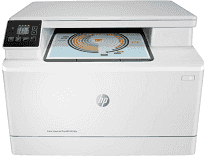
The supported print technology for HP Color LaserJet Pro MFP M180n printer is the laser print method which maintains color. There is also provided driver support for duplex printing on both sides of the page. The best print resolution is also about 600 x 600 dots per inch (dpi) with a maximum print area of 216 x 356 mm. The monthly duty cycle for this machine is up to 30000 pages with HP PCL6 and PCL 5c print languages.
HP Color LaserJet Pro MFP M180n Drivers for Windows
a7cdc511bdf2ff273e2d01e985e9e8bffce02eb25ee8d951a235c33aefa1f9097e2bd1aede7cc37e2f5d0246bdfaca0b90b25eb26091ac3f883597d669ea5eebedd82623ba88808aeec7a5d6c4ac481dd2adb7158793f70ab25a92e9f42dbfa37ad5230f5d2857e46d93a6ad839c1b2a69d2525618df71a1d3b1ea05ad853150295e4df666fa875808094cc76ae55c09d48cde9bf03432f7eef7830896974bb6ecf28f0717030232a035fad7526cd778413b4e2675042cf8312b0a0889e914d913ecf6c05f207b5f1461a1499e01750b661a113c5dc8a720b8699bdfd74f0d25f60f54f607e9fd0d98b991b0f273a370b1c1112f794d818060416b2a65cf1f9256a177a1871b207548b705683228aa1673d266d2a663ddfa94f7022a12b390b6eb727293767ac87183406c24c35cea7756c5b4acbcd130e968e6f166c6c95c08bea1ab4fb7079681cb60e7dcc19ffdcaa8f955a7b4c018f4b44c5ff05cf20973b5e03eff7772b8ff14e6bc09e7d3ece79fdc058ac93e597d4de58ea65cd131a1680967e8c32026bc2071ce27a65e55a2e26501f405a8a09c0324f59a974f1cc2252e3bb84737038c907650b13a150fe34cfaddc5810fa8a17e29b0e1e3e49fed9086a918c0d2b80dc034ad79fe64f90fc0fb244fb9ed7af2c3c9e71cf03979831088425bc237bfabaf7ff8fedb6675d2bc6a55836caa899688eda82c404247313e1529cc2cf7f249d20d574f41e6d32f7e9ce1341e11553bec91c6fa19a34663f50dad657f400372a066f31d5596db54ad4d289fdcdaf11f1209f7c83f8ebfaef50dad657f400372a066f31d5596db54ad4d289fdcdaf11f1209f7c83f8ebfaef50dad657f400372a066f31d5596db54ad4d289fdcdaf11f1209f7c83f8ebfaeHP Color LaserJet Pro MFP M180n Drivers for macOS
99e1d18847c64a405486ae34424f0a1c8d89920d17df86c45b6b0007f101d70aHP Color LaserJet Pro MFP M180n Drivers for Linux
380632d05031b00d8219e30901b26ac0a0ec0e71c160a29fcd08f232d940f968HP Color LaserJet Pro MFP M180n printer Replacing Cartridges
Black LaserJet HP 204A Toner Cartridge (~1100 yield), Cyan LaserJet HP 204A Toner Cartridge (~900 yield), Yellow LaserJet HP 204A Toner Cartridge (~900 yield), Magenta LaserJet HP 204A Toner Cartridge (~900 yield), Black LaserJet HP 205A Toner Cartridge (~1100 yield), Cyan LaserJet HP 205A Toner Cartridge (~900 yield), Yellow LaserJet HP 205A Toner Cartridge (~900 yield), Magenta LaserJet HP 205A Toner Cartridge (~900 yield)
Specifications
Using HP Color LaserJet Pro MFP M180n Printer requires various operating systems with varying requirements. For instance, the compatible operating system versions include Windows 10, 7, 8 with 32- or 64-bit OS. These OS versions should have at least a hard disk space of 2GB. Apple users should have the Mac OS versions X Sierra (v10.12), El Capitan (v10.11), or Yosemite (10.10). These OS versions also require a minimum hard disk space of 1.5 GB. This printer also comes with a one-year limited warranty for the hardware components.
The printer smart software features include wireless printing, Ethernet networking, Wireless direct printing, HP ePrint, Apple AirPrint, and Mopria certification. As a power maintenance feature, the printer runs an auto on/off technology as a means of saving power consumption. It also supports the use of HP Smart App and HP JetAdvantage Secure Print.
The printer uses four different cartridges, each for printing in black, cyan, magenta, and yellow colors. The replacement cartridges are HP 204A black and color LaserJet toner cartridges. The latter can print up to 1100 pages in black while the former can do about 900 pages on the average. A spectacular feature is also the HP SureSupply which alerts the user of any print cartridge that is running low. This feature also helps with easy replacement through online purchase without hassle.
Technical Details
| Title | HP Color LaserJet Pro MFP M180n Drivers |
|---|---|
| Device Type | All-in-one printer |
| Driver Version | Varies by driver and operating system |
| Available Downloads | Drivers |
| License | Free |
| Manufacturer | HP Inc. |