
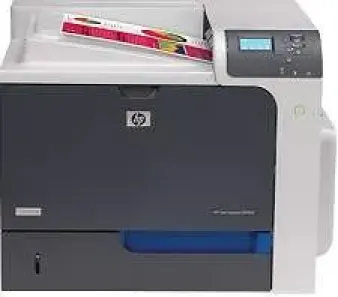
Perfect for small and medium-sized offices, the HP Color LaserJet Enterprise CP4025n is an efficient and robust working machine. It has many unique features that are helpful for all the office-related printing needs. The inbuilt 512 MB storage can store a plethora of documents in the printing queue. With effective securing of the documents and integrated networking solutions, this printer has a lot to offer.
HP Color LaserJet Enterprise CP4025n Drivers for Windows
689f517392331144baaa7a283c92b57f3edac18410d7a9543fb68dc9ece8df9495c55baa2b2924158cdeb4ff8941ff6e427b1b7bb801ddf09e80a044e412abd44a7a116ec27675527ff68b5755c343735401c27602534d6784d99ddf2adf0eb50bf8c645e939884fc80c3d66f102f46817d6652860fcf8106db3a2032a526c842b19620855efe234ed403ea1d16ea681582476c6bf14ae267dc3b0dd030775babc6c26f2e89e936e293b2212abcb5be2357074744d6e368398e4e831c216d9bcffd4461878d45eaec730b237a247946f968fd4a9e51a03d7c49775cefdfbc61aa64a14568e484b3d08f3338dc709287193f7b7cd8f109518b28c3ae0701bc69f822ffbb02f33a5d18f8485b0674c35efc801e8890cf1dde41137c0956a7eed880693173d8d1f6947263cafc7c835af79ba70153feb0bd4453f557497c24c8930037d971359cf89f9333e8ee9616e32b360ad424519b4d9f60f41c63e02b26e4341828dc31c13c10f42f9a3d38f98e3306b0acae2a60b9228f4f8561f6e56e2c8f938a5f1efeb1cfbcc16a16e890240bbc89428f0d5a90a0ecc9b1f35e3983d1074a380a23437c4fefad00a5e8eb4e07567573dcbb0252028ec8cb705964e9a77dbd500b65648de46c47dff9938f43a085dbcc073ea01aedf250a97eff842d8d2df77000f993a4c410689f22ac064f74dbe6f0ed6c034503cdc9934d7c1b8a763HP Color LaserJet Enterprise CP4025n toner cartridge.
HPCE260A Black LaserJet Print Cartridge (~8500 pages ), HP CE261A Cyan LaserJet Print Cartridge (~11000 pages ), HP CE263A Magenta LaserJet Print Cartridge (~11000 pages ), HP CE262A Yellow LaserJet Print Cartridge (~11000 pages )
Specifications
With the Windows XP operating system, it needs 256 MB of RAM, an Intel Pentium II processor along with 220 MB of free disk storage. Systems running Windows 7 need 1 GB of RAM and 16 GB of disk space, along with a 1GHz processor. MAC OS X 10.6 or lower versions need 256 MB of RAM and 160 MB of free disk space. It can also operate with higher MAC versions up to version 10.11. The printer also supports Linux 8.x or above versions easily.
The efficient operations mechanism of the machine allows the first page to be printed in less than 10 seconds for both black and white and colored pages. State-of-the-art HP ImageREt 3600 technology allows the resolution to peak at 1200×1200 dots per inch. The highest language working on the printer is HP PCL 6.
It can support various types of paper including plain paper, transparent films, labels, company letterheads, and thick film sheets. For storing all these sheets into the tray, its capacity kept at 500 sheets for plain paper and up to 100 labels, 50 transparency and card stack capacity. The output tray has similarly 500 sheets capacity.
The front control panel has 7 step buttons to customize its operations, and the animated graphics enable interactive communication between the user and the printer. Above all the monthly duty cycle can reach up to 10000 sheets conveniently.
Technical Details
| Title | HP Color LaserJet Enterprise CP4025n Drivers |
|---|---|
| Device Type | Printer |
| Driver Version | Varies by driver and operating system |
| Available Downloads | Drivers |
| License | Free |
| Manufacturer | HP Inc. |