
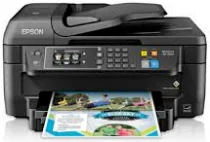
The supported print technology in the Epson WorkForce WF-3520 printer model is the piezoelectric inkjet print method with a 4-color inkjet component. Its nozzle configuration includes 384 nozzles for black document printing and 128 nozzles per color for printing. It also has a minimum droplet size of 2 picoliters (pl) with a variable-sized droplet technology. In contrast, its supported ink type is the modern DURABrite Ultra component for an office desktop choice.
This combo package contains
- Printer Driver
- Scanner Driver and EPSON Scan Utility
- Fax Utility
- Event Manager
- Software Updater
- Network Installer
Epson WorkForce WF-3520 Drivers for Windows
5e252ff5bd66f935a2d26bf4902b30d524fdf91496a71e6ecca8b70ff6d1d2c12b352f54191f14acb56ccda214cec0c252905d87b2665242dba7f7cd64189993f0165f26c39be847cb4b2935206fec4b0491888941f6856a2d2f200f585c8a348ae47dfdd8f32e2a4944f874dd28f7188bc34134eac0ef0ce9cb46935d71a8c299703ec56fe403526da577cbd360ab769d5e15334a190d34e74de22071e815eb82a74c48e83f6c377d04302af9976719a1b6200747ab7a5574f629954f544611f6f847ae7efaec123ea9ca325dbded6bc18021b113442c975358ef73bd6b8b26Epson WorkForce WF-3520 Drivers for macOS
024fb37780db32c17eddfcb020358aea379e1107db9a94d1fccadc31288616c4f8bf886a2505f7c65da20df5113d1e58c05f38737090233c1c02f132609e3d2e28b9d7669e94aabee3183736e2fb98ccd080f102e9fb44bc872eff81b868dfdc3dee4cd767cb069e2dbe84397f91aebd12061a2181f517a59a28efa52ed0b1e22913a063b44b69a726caf9baa787fbf9baad47cdd65a848dd157da3af92f6895498b7a309cb01e29d5749aa5dccf5f7753d7b00011f6d1eef76a8d7952763322319026e445ea179b27455527a34f991c0727f85cca0ee32f76c6d5a4406a2a823d65f832e1c8ae053c217f94ac0d7490bd78d524f14908c36eeb8b7176cf3a2a5546c857e0b9488b4e6314fb50f476048f8dd8c13db7da08dffad99d7c168a6bEpson WorkForce WF-3520 Specifications
According to the ISO/IEC 24734 standard, print rate measurement has a print rate of 15 pages per minute (ppm) for black document printing. Also, color printing with this device has a print speed of 9.2 pages per minute (ppm). On the other hand, duplex or dual-page printing has a print rate of 7.9 ppm on A4 paper for monochrome. Meanwhile, the color printing in this mode has a print rate of 5.7 ppm.
The maximum print resolution from the Epson WorkForce WF-3520 device is up to 5760 x 1440 dots per inch (dpi) at an optimized level. The device’s printing volume is up to 12,000 pages in a month with support for the four colors. It can also scan as a multifunction printer using the contact image sensor (CIS) element. It also has an optical resolution of 1200 x 2400 dots per inch (dpi) for the horizontal and vertical dimensions.
Besides, the single-sided scan speed with a resolution of 300 dpi is about 1.1 milliseconds per line. But at 600 dpi, the rate is 1.9 milliseconds per line, also in the single-sided scan mode. Faxing with this device uses the walk-up black/white and color capability. Meanwhile, the error correction model is CCITU/ITU Group3 fax with a standard component. It also has a page memory that can take up to 180 pages with the ITU-T No. 1 chart.
Technical Details
| Title | Epson WorkForce WF-3520 Drivers |
|---|---|
| Device Type | All-in-one printer |
| Driver Version | Varies by driver and operating system |
| Available Downloads | Drivers |
| License | Free |
| Manufacturer | Seiko Epson Corporation |