
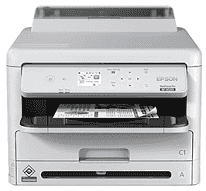
The Epson WorkForce Pro WF-M5399 printer is a top-of-the-line monochrome inkjet printer for business environments requiring large printing and exceptional printing efficiency. This heavy-duty printing solution blends the extra speed of up to 24 ISO ppm printing with the impressive cost-saving value of an enhanced-capacity ink system. Whether running document workflows from a small office to an enterprise environment, proper driver installation is key to the full functionality of the printer. Therefore, this guide perfectly addresses the complete installation and troubleshooting process to configure the Epson WF-M5399 drivers on Windows and macOS systems into any existing workflow.
Epson WorkForce Pro WF-M5399 Drivers for Windows
d5841738b8efc6dd0c976344c96f10ebced24f8bdc642bc3c47d6a373a69aed9e07ca282146d00569e48a6ec886a54ecc03cb7e827b31b978f7ce32261976b5c2d9308e77a79987ce7d4c72d82c63b449edd1ae705d992644805c499dca0b63caf26a4c810ba4def9ca94cb650275991a9df787743a4f6e8f7ad720624880a545cd9fd4ecb01deb85edb41407360d15becec25c29bbef977a67ea9b840d9fa3fe9b08a0926658f18a6d0f35c7f6a13ab4614f46c19afa48784f2cc15d3302e1a8c298c73c790f154959a9c9a56c2e86004a330e7a96c963b3ffa98a0e2c857da2857d09e94cf19ed7529ad8e9d8957b29e01733e1c1fc2a6f003700c3fdca36af6f847ae7efaec123ea9ca325dbded6bc18021b113442c975358ef73bd6b8b26Epson WorkForce Pro WF-M5399 Drivers for macOS
4ff323d340fb006d73c02b51add069aea744510e2e4cb2d98bd694ed3d501f8d771806ae09c06b23ff79a6b907e058a2316cfa5f63b0dde2ca7a0ab4fcb7e018319026e445ea179b27455527a34f991c0727f85cca0ee32f76c6d5a4406a2a82944e14575dbddd85db218b97761c1ab91bed6375e944478e5f9002ab26fb0164Epson WorkForce Pro WF-M5399 Windows Driver Installation Process
Installing the Epson WorkForce Pro WF-M5399 driver on Windows systems, one should note that various methods can be adopted for any given user preference. The simplest and, without a doubt, the quickest way is to run the installer package from Epson, which directly handles device detection, driver installation and basic configuration with very little human input from the user’s side. Silent installation features prompted by command-line parameters allow some IT administrators who manage multiple installations to further help with mass driver deployment over networks. Nevertheless, advanced users could always go for Windows Update as the drivers offered there, while working, would offer the most basic functions. However, as always, Epson’s website hosts the newest drivers with functions extending beyond printing, such as advanced handling of paper and ink management tools.
macOS Compatibility and Installation
The dedicated driver packet is optimized for Apple’s OS architecture, thus allowing top integration with macOS. Installing onto macOS systems will be an easy task with an intuitive process utilizing the conventional Apple installer package format. Hardly any technical knowledge is required to run the installation while assuring proper integration with the system. The driver fully supports the native printing features of macOS, which include AirPrint capability for wireless printing from any iOS device without any extra steps for configuring it. Users appreciate how the driver integrates perfectly with the macOS Preview application for document handling. However, the Epson Printer Utility also provides access to maintenance functions, ink level checking, and network configuration from the Mac interface.
Troubleshooting and Optimization Features
The Epson WorkForce Pro WF-M5399 driver package features advanced diagnostic tools for easy and smooth troubleshooting of standard connectivity and print quality issues. Network configuration problems will be automatically diagnosed and corrected by the built-in troubleshooting tools; print head alignment will be executed, while print settings will be optimized based on the media types used. Driver conflicts users face can be eliminated using the clean installation utility provided, which completely uninstalls the drivers at an advanced level.
Technical Details
| Title | Epson WorkForce Pro WF-M5399 Drivers |
|---|---|
| Device Type | Printer |
| Driver Version | Varies by driver and operating system |
| Available Downloads | Drivers |
| License | Free |
| Manufacturer | Seiko Epson Corporation |