
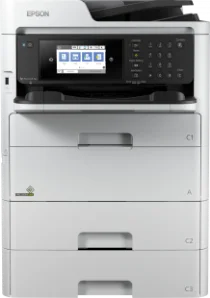
The Epson WorkForce Pro WF-C579R printer model can work with the PrecisionCore print head, making it suitable for office workgroups. It can also print, copy, fax, and scan documents to produce good quality and speed as a multifunction printer. At the same time, the nozzle configuration comprises 800 nozzles for black and another set of 800 nozzles for color printing. At the same time, the Epson WorkForce Pro WF-C579R has an internal driver that makes it suitable for duplex printing.
Epson WorkForce Pro WF-C579R Drivers for Windows
de429084ef165a6800e9967ad4a24588c03e9a2679492a031ae2978a8044e1520c48725dd23f4e13e65a005cc0a0c3a4160f51e916dcf5c981a56fbdac7ff96ed26e6c05e28dcc493db9dd44608acfaac2508fa4c4d47316916e2890a52fbff3354e6c8509ba784f9de4d4c9a59e8343c02e70abe5051435c9280d5a25fff34f1b50047b34ff0b1317e7fd314b7fbf17cd7c8476396d832ea76c28a90414c4838f3688dcabff7c0a8d38d5ed4ce0015fd3ef35df7729bebd70eecdf161336016618426a38e080199c762fea8ea11a9e05f38ef80a84169462c834915619d3ec550b678e4f83bf7c8f234e61c32eb2bc7f3465902995fa769d177b5529c4afe89a549c9be030616259d5b5d416dd81aff7f651251b6f574e79eca50b60a343538c425de2e61dc62b514f943e75cdd8a8c3d5033e96b6721c3e15e58c49399811c757aabe56ce026e425f2140683fbc3b3ccb98d7f22682fd0441d15672f6fbb5c262f02062cb53d653b6d97e6144cf0d8f2db37f45598fd63ddb2cd0e2c6721e232e9c847ce5222411bfe10ac7e296ecf5ac5690468971805e98ac958ac077dc52c7faa570d510c8e9220211ee1530d1e74236f351abbb049f19ddc06d58c3c322857d09e94cf19ed7529ad8e9d8957b29e01733e1c1fc2a6f003700c3fdca36af6f847ae7efaec123ea9ca325dbded6bc18021b113442c975358ef73bd6b8b26Epson WorkForce Pro WF-C579R Drivers for macOS
c1ab5720ae5cdb12320a5957ed3c9b110d007765bff3f67bf1c1c7876b2f746990b85d71f38ab9338ed6f2bc3714355a7031070cb7254b110ee091c7e352588b5e6017d4232cd8f4139f0f6060aafbb0494fdb0c8c56831552e375a83b9ef8fd734831ae518525435e1946a30149979e207968c011a8bc50cb8ca8f52b5f20b6319026e445ea179b27455527a34f991c0727f85cca0ee32f76c6d5a4406a2a823d65f832e1c8ae053c217f94ac0d7490bd78d524f14908c36eeb8b7176cf3a2ab815926fbe45af322cfa74e6bc073b01a2f53e9aaa2a953d613cbabbc8d55cb2Epson WorkForce Pro WF-C579R Specifications
The minimum ink droplet size is about 3.8 picoliters (pl) with a variable-sized droplet technology. In contrast, the compatible ink technology is the replaceable ink pack system (RIPS). Concerning the print speed, the first page out time is about 4.8 seconds for a black page and 5.3 seconds for a color page. At the ISO/IEC 24734 print standard mode, the printing speed is 24 pages per minute (ppm) for black and color printing.
However, the duplex printing speed at the same mode is 15 ppm for monochrome and color printing. On the other hand, the standard printing mode has a rate of 34 ppm when printing black and color documents when the average weight is 75 gsm. At the same time, the printing resolution is up to 4800 x 1200 dots per inch (dpi). However, the maximum printing volume of the Epson WorkForce Pro WF-C579R machine is up to 50,000 pages monthly.
The manufacturer recommends a production volume in a range of 400 and 4500 pages in a month. As a scanner, this machine can produce a speed of 30 images per minute (ipm) for single-sided scanning at 200 dpi. On the other hand, duplex scanning has a rate of 60 ipm at the exact resolution of 200 dpi. When scanning through the flatbed, the scanning speed is about 5 seconds per page.
Technical Details
| Title | Epson WorkForce Pro WF-C579R Drivers |
|---|---|
| Device Type | All-in-one printer |
| Driver Version | Varies by driver and operating system |
| Available Downloads | Drivers |
| License | Free |
| Manufacturer | Seiko Epson Corporation |