
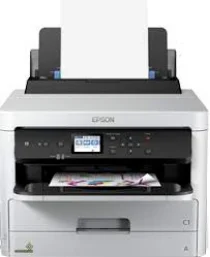
The Epson WorkForce Pro WF-C5290DW printer model works with the PrecisionCore Print head while using the DURABrite Ultra ink technology. It is also compatible with an office workgroup as a print-only device. Also, Epson WorkForce Pro WF-C5290DW has an internal driver suitable for different OS versions, including Windows and Mac. This driver also makes duplex printing possible. The first page out time is about 4.8 seconds for black documents and 5.3 seconds for color in print speed.
Epson WorkForce Pro WF-C5290DW Drivers for Windows
d95b71ebaf76f72fc36f83ac7036c8d06198ef9b156042a6b259beb1698cf61a4221db8ad658d5603572d46de2f17499c867c3773e5d826d51b69be3fc327c410c48725dd23f4e13e65a005cc0a0c3a4160f51e916dcf5c981a56fbdac7ff96ed26e6c05e28dcc493db9dd44608acfaac2508fa4c4d47316916e2890a52fbff3354e6c8509ba784f9de4d4c9a59e8343c02e70abe5051435c9280d5a25fff34f1b50047b34ff0b1317e7fd314b7fbf17cd7c8476396d832ea76c28a90414c48387203fb16e13a3c9dfa6a6c969ddf3eb08d6f20cd251d7715e3771322df0953a453cea1e538021c4768812e0229361a8c69e86d6d8b294b93048c74bccf56c6e5dcaae2d844cc61d606d82009cafd817ff7c22c3f0ac5f8eed22998c742a7109492393d0344849d19db134db6021fad9753db7ce9db0ff926721be35b5cf6bd5c3d0215f8edeaf83b10385b9c61c4e2022dc11c949bf89db425b1c8d8f9f1c8bf3a864d2bf7a7132cf2b7f760fac32a1e4f13019ba3296491cf10fb1d450c2fc0f8873f80decceb9ef1227decaab621de166ce5ea8bdcd8b2a5cbdc2852f170589af49ae73b1263f233313b3f5933de60cfa41ced375d5470bd1f959eb4f4da12857d09e94cf19ed7529ad8e9d8957b29e01733e1c1fc2a6f003700c3fdca36af6f847ae7efaec123ea9ca325dbded6bc18021b113442c975358ef73bd6b8b26Epson WorkForce Pro WF-C5290DW Drivers for macOS
75ab4695d3be0baa5f9cdfd24a18bb990baa08961aeb18e8bab25d196b905bd48655d6c927c446899226f1db75dd45c4f1861c193cfa50b0ceb8d7fefb1baeac5e6017d4232cd8f4139f0f6060aafbb0494fdb0c8c56831552e375a83b9ef8fd319026e445ea179b27455527a34f991c0727f85cca0ee32f76c6d5a4406a2a823d65f832e1c8ae053c217f94ac0d7490bd78d524f14908c36eeb8b7176cf3a2ac814f5e29a58f9fa5acc145333dd4427eb4918b2611895bdebc3dd9a57587905Epson WorkForce Pro WF-C5290DW Specifications
When the Epson WorkForce Pro WF-C5290DW printer is working in the ISO/IEC 24734 mode, the print rate is 24 pages per minute (ppm) for color and black documents. On the other hand, duplex printing on this same model has a speed of 15 ppm for both color and monochrome documents. Printing is about 34 ppm for color and black pages at the standard rate, while the average paper weight is about 75 gsm. It can also produce an optimum printing resolution of up to 4800 x 1200 dots per inch (dpi).
The maximum duty cycle is up to 45,000 pages in a month in terms of its print capacity. At the same time, the recommended duty cycle is between 250 and 2500 pages per month. As a color printer, the compatible colors include cyan, black, yellow, and magenta. Its network printing protocols include LPR, WSD, FTP, LDP, IPP, Port 9100, Net BIOS over TCP/IP, Bonjour/AirPrint, and WSD-Print. At the same time, the network scanning protocols include NetBIOS over TCP/IP and FTP.
The compatible paper formats include C4, legal, letter, A4, A5, B5, photo paper sizes, B6, C5, #10 envelopes, and user-defined sizes. Meanwhile, the compatible paper weight is between 64 and 256 gsm. Moreover, the standard paper input tray can load up to 250 sheets of plain paper in addition to 80 sheets through the multipurpose tray. However, the output tray can accommodate 150 sheets of printed pages.
Technical Details
| Title | Epson WorkForce Pro WF-C5290DW Drivers |
|---|---|
| Device Type | Printer |
| Driver Version | Varies by driver and operating system |
| Available Downloads | Drivers |
| License | Free |
| Manufacturer | Seiko Epson Corporation |