
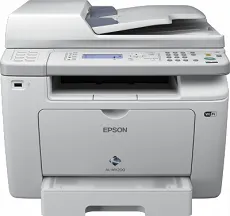
The Epson WorkForce AL-MX200DWF printer model has LED indicators inside the 4-in-1 multifunction printer. However, it is a recommended printer model for small office workgroups as well as home office uses. One of its outstanding characteristics is the presence of the AcuBrite toner system technology. It can also produce an optimum print resolution of 1200 x 1200 dots per inch (dpi). The print rate for monochrome or black and white printing is up to 30 pages per minute (ppm) for one-sided printing. However, the first page prints out only after 7 seconds.
Epson WorkForce AL-MX200DWF Drivers for Windows
aa237fac13b9304f6e26a8a9df44b104bad0b1466ac44beed97e73229a2e5fee2dfde80453288c10110218b48a4014ea3ccf4abfd85b5ce771bb552e2d412fe44eb72f0dc02ff5277a297cb294b250badfb68f5fee1a9412369e117fc8afcd5dEpson WorkForce AL-MX200DWF Drivers for macOS
05b1313ef6280fd02638ccef256b4b410c59d7ff771b1ef4ee276a69fda28ce1bb2eb3cc3679b84cfc2f1feeb6b477c61c0b89abf79313d55a21d41bd0461577f3a0ff362ee4ee4764cb7962b5ea3a4d5964b2f396e9e955d7e87ca4a7c2996490071b11984600791b1ab1b58f654ee83a3a90fed5e5b6be2162f41461badfc7Epson WorkForce AL-MX200DWF Specifications
The machine also takes about 45 seconds to warm up but reaches a print volume of up to 30,000 pages in a single month. The connectivity with the device is compatible with the high-speed USB 2.0 port, a wired network, and a USB host. Besides, it supports network printing protocols such as Port 9100, TCP/IPv4, and TCP/IPv6. The options include SNMP, BOOTP, WSD, POP3, HTTP, DHCP, mDNS, and SMTP concerning the network management protocols.
As a scanner and copier, the Epson WorkForce AL-MX200DWF machine uses the flatbed scanner component for TWAIN and WIA drivers. This mode can also produce an optical resolution of up to 1200 x 1200 dots per inch (dpi) for horizontal and vertical sides. Some advanced document integration methods include the scan to email, scan to FTP, and scan to USB. As per copying, the resolution is up to 600 x 600 dpi. The copy speed is also up to 20 pages per minute, while the first copy out time is 20 seconds.
Furthermore, it also has a multiple copies mode, producing between 1 and 99 sheets of plain paper. It can also zoom in/out between 25 and 400%, while the scanning color depth is 24 bits for color and 8 bits for monochrome.
Technical Details
| Title | Epson WorkForce AL-MX200DWF Drivers |
|---|---|
| Device Type | All-in-one printer |
| Driver Version | Varies by driver and operating system |
| Available Downloads | Drivers |
| License | Free |
| Manufacturer | Seiko Epson Corporation |