
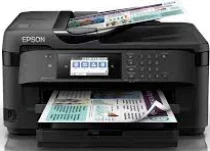
Epson WF-7715DWF is also a captivating device that contains a PrecisionCore Print Head with 800 nozzles for black printing and 256 nozzles per color. Also, the minimum droplet size is about 3.8 picolitres with variable-sized droplet technology. Meanwhile, the Epson WF-7715DWF contains a stunning internal driver compatible with both Windows and Macintosh OS versions and a mobile OS. It also has the DURABrite Ultra ink technology that suits a multifunctional printer.
Epson WF-7715DWF Drivers for Windows
bd7d6959260492da6628e3b27e4e626dce083748a49e455368069d0f7d758ccf9bebc16a0b2d96cb1e268e149dc045bbb0b277b5aafc730dacd9b47bbba9b546babb0cee350aad5a52375f0c5940a406e61f54d001e1ea9768824a6420db7802e296b0dd6f562045ca62037185b78ea08935c2397617465e6551a239e6f13b6cfa5b5b16613222e7e58b0e6ee417a15601df4dd00148222a8095908bcf3fc4feEpson WF-7715DWF Drivers for macOS
f429308a18d15573ea926200758ed2a2e8e214cc18d5c739cef8608863d080432a6cad5c600a47330332aa1f11ebc97625c092b7ab982bdceacaf2d936efcc8cfaa0499d767ba4fec326117a5cb3549b62787c5153a9488e088ce35ff97e32ca90071b11984600791b1ab1b58f654ee83a3a90fed5e5b6be2162f41461badfc7Epson WF-7715DWF Specifications
By the way, the all-in-one functions of the Epson WF-7715DWF model include the ability to print, copy, scan, and fax documents. In the ISO/IEC mode, printing runs at 18 pages per minute (ppm) for monochrome and ten ppm in color. The optimum print resolution is up to 4800 x 2400 dots per inch with an optimum production capacity of 20,000 pages per month. However, the manufacturer recommends sticking to a duty cycle between 200 and 2500 pages.
In scanning, this machine can produce output at 6 seconds per page at 200 dpi. But the rate of color scanning is about 12 seconds per page through the flatbed. It also has an optical resolution of up to 1200 x 2400 dots per inch (dpi) for the horizontal and vertical dimensions. Meanwhile, the output formats include BMP, PDF, PNG, TIFF, and JPEG from the contact image sensor (CIS). All these qualities establish the quality of the printer itself as a particular model.
In faxing, the machine supports walk-up mode for black and color faxing capability with a transmission speed of up to 33.6 kbps. Also, the approximate modem speed is about 3 seconds per page with 200 names and numbers to constitute fax speed dials. Moreover, the favorite fax functions include the PC fax, auto redial, and speed dial. The page memory is up to 550 pages, about 6 MB for an ITU-T No.1 chart.
Technical Details
| Title | Epson WF-7715DWF Drivers |
|---|---|
| Device Type | All-in-one printer |
| Driver Version | Varies by driver and operating system |
| Available Downloads | Drivers |
| License | Free |
| Manufacturer | Seiko Epson Corporation |