
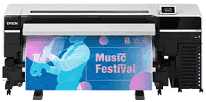
Epson SureColor S8100 driver software is something you have to install on your computer, as it provides you with good integration between your computer and printer. It ensures that the print command sent by you is the same as that received by the printer. Installing an updated driver for your printer will make sure that your printer performs better, can solve many issues related to printing that you were unaware of, and will be compatible with your operating system. Also, updated drivers provide some additional functionalities and performance improvements to your printer.
Epson SureColor S8100 Drivers for Windows
7ec554273665ea95a0e0997ef0dd35874d36fcb1737298f7b9340047a3a23444968fb0d3d575953893701e0689f9a8615e470342c166d703965602dc02c18dffOverview of Epson SureColor S8100
Epson SureColor S8100 is an eco-solvent printer for commercial-level manufacturing of signs and graphics in large format. This is the perfect blend of performance and versatility, offering incredible image quality and being easy to maintain with almost zero effort required. It is perfect for any printing shop that creates banners, vinyl graphics, vehicle wraps, and other kinds of commercial signage.
Being equipped with one of the best PrecisionCore MicroTFP printheads from Epson, the SureColor S8100 is capable of producing detailed colors of excellent accuracy regardless of the media type used. UltraChrome GS3 inks produce amazing colors while transitions are smooth at the same time, and, furthermore, inks are very durable under outdoor conditions. Not to mention, it is equipped with automatic maintenance features that help save your time.
Regarding its design, Epson SureColor S8100 aims to provide efficiency without much energy consumption. The printer is characterized by printing speed, low maintenance needs, and good operability, which will provide you with maximum effectiveness in using the device.
Features of Epson SureColor S8100
* Equipped with the state-of-the-art PrecisionCore MicroTFP printhead
* Eco-solvent printing is fast and provides high-quality results.
* UltraChrome GS3 cutting-edge ink technology providing eye-catching and durable prints
* Produces very good images with perfect color gradations
* Automation helps to take care of the printhead when cleaning.
* Wide media support, not only for signage but also for display materials
* Touch screen is included and very user-friendly
* For remote usage, there is an opportunity to monitor and control the printer remotely
* Media feeding system is highly reliable and won’t stop your job
* Many applications are supported: banners, vehicle wraps, posters… etc
System Requirements and Technical Specifications
* Print Engine: PrecisionCore MicroTFP Printhead
* Inks: UltraChrome GS3 Eco-Solvent Inks
* Maximum Media Width: 64 inches (162.6 cm)
* Typical Uses: Signs, banners, vehicle graphics, wall papers, and other display graphics
* Connectivity Interface: USB, Ethernet LAN
* Ideal Operating Environment: Commercial environment
* Power Requirement: AC 100, 240V, 50/60Hz
* Ideal Operating Environment: A well-ventilated room with adequate space to operate the printer
Technical Details
| Title | Epson SureColor S8100 Drivers |
|---|---|
| Device Type | Printer |
| Driver Version | Varies by driver and operating system |
| Available Downloads | Drivers |
| License | Free |
| Manufacturer | Seiko Epson Corporation |