
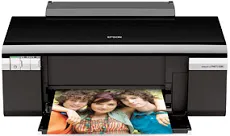
Epson Stylus Photo R280 is an excellent printer choice among the Stylus category of print machines with a friction paper feed. It also uses the Epson MicroPiezo head with the DX5 variable droplets with a sheet feeder and a top entry. The sheet feeder can again load up to 120 sheets of plain paper with an average paperweight of 20 lbs. when printing, the machine has a width of 17.7 inches, a depth of about 22.5 inches. At the same time, the height is approximately 11.3 inches.
Epson Stylus Photo R280 Driver for Windows
Driver and Software for Mac OS
Specifications
This machine also has a net weight of 11.9 lbs, about 5.4 kg without ink cartridges. The compatible ink cartridges are combinable with colors such as black, cyan, yellow, light cyan, light magenta, and black. The Epson Stylus Photo R280 machine requires some environmental conditions to perform at an optimum level. For instance, the operation mode requires a temperature between 10 and 350C, while the storage range is between -20 and 400C.
However, for the sake of the relative humidity, the operation range is between 20 and 80% with no condensation. On the other hand, the storage range for relative humidity is between 5 and 85%. It can also connect through the standard USB 2.0 hi-speed port with a unique device class for computers. The compatible paper sizes include A4, B5, A5, B6, legal, letter, photo paper sizes, and some user-defined sizes.
Epson Stylus Photo R280 model can work with various paper types, including the bright white paper, paper matte, ultra-premium photo paper glossy, and premium presentation paper matte for double-sided printing. Others are the iron-on cool peel transfer paper and photo quality self-adhesive sheets. Each of these standard paper types has varying capacities to fill up the paper loading tray space. For instance, the machine can accommodate 120 sheets of bright white paper. Download Epson Stylus Photo R280 driver from Epson website