
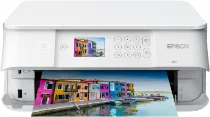
The Epson Expression Premium XP-6005 machine comprises the Epson micro piezo print head and a compatible nozzle configuration. For instance, it has 360 nozzles for black printing and 180 nozzles for color printing. It also contains 1.5 picolitres as its minimum droplet size with a variable-sized droplet technology. Meanwhile, its ink technology comprises Claria premium ink. At the same time, the Epson Expression Premium XP-6005 comes with an automatic print driver for OS compatibility.
Epson Expression Premium XP-6005 Drivers for Windows
46ae5b3b0b7fb39fb8632bb8ff36ba76e217cceb6d81ddf532a44709d275ba237542a22035278d392c39dc6f0f191e76d26bad9b75adcea36b562b36afde90f3a98ce40301756f6fb484e2f1ed8fcfe40e5d2238d1781ae52358e3c99c16cedfe296b0dd6f562045ca62037185b78ea08935c2397617465e6551a239e6f13b6cfa5b5b16613222e7e58b0e6ee417a15601df4dd00148222a8095908bcf3fc4feEpson Expression Premium XP-6005 Drivers for macOS
cd155a4f9017f5e5d053419dcc7653058d32935e684bfe269d3e68f40161937951ecfb3b85157434ee950153f430d924b80be6c5ee2e61b274cd3c1185e1e3d290071b11984600791b1ab1b58f654ee83a3a90fed5e5b6be2162f41461badfc7Epson Expression Premium XP-6005 Specifications
At the same time, the printing resolution is up to 5760 x 1440 dots per inch (dpi) as a home and photo printer. Its essential functions include the ability to print, copy, and scan documents. The Epson Expression Premium XP-6005 machine runs at 15.8 pages per minute (ppm) for black documents and 11.3 ppm for color documents in print speed. Both rates apply to the ISO/IEC 24734 standard print mode. However, the normal printing mode has a speed of 32 ppm for both black and color documents.
When scanning, the optical resolution is about 1200 x 2400 dpi for the horizontal and vertical sides, respectively. At the same time, it contains a contact image sensor (CIS) element. The machine has a multifunctional tray containing 100 sheets of plain paper and 20 photo sheets in terms of paper handling. It is also compatible with standard paper formats such as the A4, A5, B5, B6, envelopes, letter, photo paper sizes, and custom sizes.
Concerning energy use, the rate of consumption depends on the current mode of the printer. For instance, the standalone copying mode uses 18 watts while the sleep mode requires 0.7 watts. When the printer is in the ready mode, the power usage is 6 watts, while the power off mode requires 0.2 watts. Meanwhile, the supply voltage is between 100 and 240 volts, while the frequency is between 50 and 60 Hz.
Technical Details
| Title | Epson Expression Premium XP-6005 Drivers |
|---|---|
| Device Type | All-in-one printer |
| Driver Version | Varies by driver and operating system |
| Available Downloads | Drivers |
| License | Free |
| Manufacturer | Seiko Epson Corporation |