
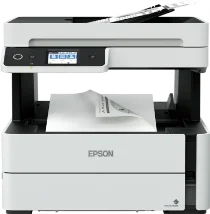
The printing method for the Epson Ecotank ET-M3180 model is print-on-demand inkjet technology with a piezoelectric. It also has a nozzle configuration with two 400 nozzles for black documents. The minimum ink droplet size volume is about 2.8 picolitres (pl). The contents of the printer box include an ET-M3180 EcoTank Printer with an instruction manual, a CD-ROM for product setup, and a power cord. Besides, the Epson Ecotank ET-M3180 has an internal printer driver for printing.
Epson Ecotank ET-M3180 Drivers for Windows
9b01f9d410536bbef812dfa29eb1c01628922c2708dc809a4f35a03effc886a0481bc2845bcd1417d42cc77d11c3d6e6f7eb4dc9001666bce5cb457b6441a9e2d26e6c05e28dcc493db9dd44608acfaac2508fa4c4d47316916e2890a52fbff3ee4a2c1c67c56e10b141580a73fa974f660c9bb3537926cfb6305047379e83177db42242df96402adb759197040d03c4218872df19e1bcee14deb4e0687fdd23e296b0dd6f562045ca62037185b78ea08935c2397617465e6551a239e6f13b6cEpson Ecotank ET-M3180 Drivers for macOS
ec98a617616f1485240e0c8bb95508677ec8d549c478fe6aec2c1f388cedef42562ea6ca2e7568cf5e96d07d30fa2a6fa67a30b96da7bc6af8b9bca148e2219890071b11984600791b1ab1b58f654ee83a3a90fed5e5b6be2162f41461badfc7Epson Ecotank ET-M3180 Specifications
It also contains an initial ink bottle for black, while the maximum resolution is 1200 x 2400 dots per inch (dpi). The A4 paper runs at 20.0 ISO pages per minute (ppm) in terms of printer speed. On the other hand, the compatible paper size includes A4, letter, legal, A6, A5, B5, B6, Executive, half letter, DL envelopes, and C6 envelopes. The paper holding capacity of the Epson EcoTank ET-M3180 printer is up to 250 sheets of plain paper with an average weight between 64 and 90 gsm.
It is also compatible with double-sided printing with a rear slot for one sheet. Besides, the scanner type is an A4 flatbed color image scanner with an optimum size of an A4 paper. Also, the scanning resolution is about 1200 x 2400 dpi. Copying with this machine has a speed of 17.0 ISO ipm. This printer can also send and receive fax messages, including a black-and-white walk-up or color faxing capability. Its transmission speed is also up to 33.6 kbps with an average rate of 3 seconds per page.
Also, the speed dial is 100 names & numbers with a memory size of 100 pages with an ITU-T on the chart. The weight range is between 64 and 95 gsm with a rated voltage between 100 and 240 volts in paper capacity. But the rated frequency is between 50 and 60 Hz.
Technical Details
| Title | Epson Ecotank ET-M3180 Drivers |
|---|---|
| Device Type | All-in-one printer |
| Driver Version | Varies by driver and operating system |
| Available Downloads | Drivers |
| License | Free |
| Manufacturer | Seiko Epson Corporation |