
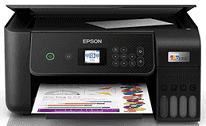
Epson EcoTank ET-2820 Driver allows for the interaction between the computer and the printer when setting up the printer and working with it later on. The driver guarantees proper compatibility of the operating system and the printer’s capabilities. Also, it helps to control the connection via USB or wirelessly to keep performance steady. Thus, the user can anticipate easier set-up and quality printing.
Epson EcoTank ET-2820 Drivers for Windows
8ff88f8c016fb2c01ad0f0c9106c6d60e2e6487dd104b40a42542cd543bc8dd356fe6acdda9bfeaa009e7537b45c76e26cd5fff96b5e63b061269771e7cab9e38c2b896d0f683b2c2cf56f3ebca661ff7cfe322d8ab77d8897fc0a68dd5876693cc1c313adfab74f957e2af63ff2fa87279169e3a043365eb0af6024d420663be01c3426f7c2f2d4620bbb250edaf843ccfaa67641c9c75c9fe03b2747cb97fde296b0dd6f562045ca62037185b78ea08935c2397617465e6551a239e6f13b6cEpson EcoTank ET-2820 Drivers for macOS
9e78e87d20d4d3c731b01b799edab9625c9078eebd25aafd3fe7acb883b8365b7d7e8721498a12783f092354a5943ed639c3c6c59f86c2954d62c4d295aa0572Epson EcoTank ET-2820 Specifications
This Epson EcoTank ET-2820 is a small-sized multifunction inkjet printer that uses Micro Piezo technology. The four-color ink tank system includes inks of black, cyan, magenta, and yellow. Print quality is up to 5760 x 1440 dpi. Such a set of parameters is suitable for printing home documents, school papers, forms, labels, and everyday color printing.
Printing speed equals 10 ISO pages per minute for black and 5 ISO pages per minute for color. The rear paper tray allows storing up to 100 sheets, whereas the output tray can hold up to 30 sheets. Supported paper sizes are A4, A5, A6, B5, Letter, Legal, envelopes, and photo paper.
Options for connections include Hi-Speed USB, Wi-Fi, and Wi-Fi Direct. This model has such features as Epson Connect, Apple AirPrint, and Epson Smart Panel for mobile printing. Automatic duplex printing is not provided, and customers need to handle it by themselves using software and paper, which makes driver settings necessary during setup.
Borderless printing is possible for some types of photo sizes, among which are small photo media. Dimensions of the printer are 37.5 cm in width, 34.7 cm in depth, and 17.9 cm in height, and its weight is about 4.1 kg. To conclude, this printer is suitable for general home and office printing.
Technical Details
| Title | Epson EcoTank ET-2820 Drivers |
|---|---|
| Device Type | All-in-one printer |
| Driver Version | Varies by driver and operating system |
| Available Downloads | Drivers |
| License | Free |
| Manufacturer | Seiko Epson Corporation |