
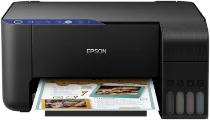
The Epson EcoTank ET-2711 printer model runs with the Epson Micro Piezo print head. At the same time, the minimum droplet size is three picolitres (pl). Also, it comprises 180 nozzles for black printing and 59 nozzles per color mode. Also, it’s compatible with dye ink with a print resolution of 5760 x 1440 dots per inch (dpi). It can print, scan, and copy documents as a multifunctional machine. Epson EcoTank ET-2711 also possesses a print driver suitable for duplex printing.
Epson EcoTank ET-2711 Drivers for Windows
b45425a5e31834d9ca739498f19786eb0039f93cae69d35b979b8fc5686af4a849e49deb5dc382fd31710a3d81112289fbdc97cebc37c6f6fa93c5ad4b77394e4eb72f0dc02ff5277a297cb294b250badfb68f5fee1a9412369e117fc8afcd5dEpson EcoTank ET-2711 Drivers for macOS
cb31071c7d6500c2cff0353c22cd04482ba5507ec4eaf4ecdc61ca1310d96d0ff11acf41820c4f4c4caecfae086d1b4d1e59dfac08eb3e575e1ec3272a2d6ac5200a3692ace9c06ccae0b3ee94130f6e7e9e82ced88dd455ef8141ec2053a50b90071b11984600791b1ab1b58f654ee83a3a90fed5e5b6be2162f41461badfc7Epson EcoTank ET-2711 Specifications
The standard printing speed is ten pages per minute (ppm) for black documents at the ISO/IEC 24734 mode. Also, its color printing rate is five ppm, while the photo printing speed is 69 seconds. The first-page out-time is 10 seconds for black and 16 seconds for a color page. Scanning at the single-sided mode is about 11 seconds with the flatbed scan for A4 paper with black documents. But the color page counterpart is 28 seconds with the flatbed scanner.
The optical resolution is 2400 x 1200 dots per inch (dpi) for the horizontal and vertical sides. Also, it has an output format of BMP, multi-TIFF, PICT, JPEG, TIFF, and PNG. Besides, the contact image sensor (CIS) element is an integral part of the scanning process. The Epson EcoTank ET-2711 machine also supports standard paper sizes such as A4, A5, A6, B5, B6, C6, DL envelopes, letter, legal, and custom sizes. But the output tray can hold 30 sheets while the multifunction tray holds 100 sheets.
The device’s supply voltage is between 100 and 240 volts, while the frequency is 50 and 60 Hz. On the other hand, energy use depends on the operating mode of the machine. For instance, the standalone printing consumes 12 watts, its sleep mode uses 0.7 watts, and the ready mode uses 4.3 watts.
Technical Details
| Title | Epson EcoTank ET-2711 Drivers |
|---|---|
| Device Type | All-in-one printer |
| Driver Version | Varies by driver and operating system |
| Available Downloads | Drivers |
| License | Free |
| Manufacturer | Seiko Epson Corporation |