
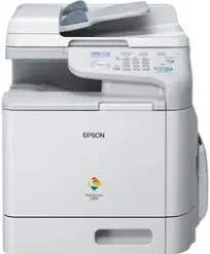
The Epson AcuLaser CX37DN model has an internal print driver that is compatible with automatic duplex printing and various OS versions. Printing with this machine runs on an A4 color multifunction laser printer. It is also compatible with primary print languages, including PostScript 3, PDF 1.7, XPS, PCL 5e, PCL6, and PCL5c. Meanwhile, it can produce up to 120,000 pages in a single month while having automatic duplex printing.
Epson AcuLaser CX37DN Drivers for Windows
c5f339bb4a83d484aea09ad82c78a4221544f7d38e5b362beba2aa2720751cf54eb72f0dc02ff5277a297cb294b250badfb68f5fee1a9412369e117fc8afcd5d5ae6bd8e39ff4f8b8f5ea15c8929973995ea20524f2757815468ecd3e5fcca6afe24b8f8215a4ab21c8e304aeff45bce0caff28b397a9fd0c8a1141cf8924f37Epson AcuLaser CX37DN Drivers for macOS
35fa6c8853b9f4ee0009f432d5cf219d5fb1907160d10baf382507ea8f36b0e5236c05d1bff6eca24829f92f45f8517dc48d91fab23b8ff8478f349805d47089fc58d44100f767dba010fe27cab5628e300d846b15d80c35fdbb8fdf6c69bd8c90071b11984600791b1ab1b58f654ee83a3a90fed5e5b6be2162f41461badfc7Epson AcuLaser CX37DN Specifications
The control panel involves a liquid crystal display (LCD) screen with about 128 x 64 dots in monochrome. In printing, the optimum print resolution is up to 600 x 600 dots per inch (dpi). It also has an internal processor with 800 MHz and an internal memory of 256 MB. But the maximum memory size is up to 768 MB. While working through the ADF feature, the document size is 215.9 x 500 mm. This feature can also take up to 15 sheets.
Printing with the Epson AcuLaser CX37DN machine has a rate of 24 pages per minute (ppm) for both black and color documents. This rate is the same for the draft as for the ISO 24734 standard mode. Meanwhile, the first page out time from the ready mode is about 16 seconds, while the warm-up time is 38 seconds. In copying, the resolution through the flatbed is about 600 x 600 dpi, while the ADF is about 600 x 300 dpi. The copy mode can also produce up to 99 copies from an original document.
Scanning with this machine demands a flatbed with an ADF scanner. It also has a contact image sensor (CIS) element and an LED light source. The optical resolution of the scanning level is not more than 600 x 600 dpi, while the scanner bit depth involves 24 bits for color and 8 bits for grayscale.
Technical Details
| Title | Epson AcuLaser CX37DN Drivers |
|---|---|
| Device Type | All-in-one printer |
| Driver Version | Varies by driver and operating system |
| Available Downloads | Drivers |
| License | Free |
| Manufacturer | Seiko Epson Corporation |