
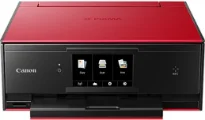
The Canon PIXMA TS9020 printer model performs exceptional work to produce top print quality at high speed. For instance, the printing rate in black and white is approximately 15 images per minute (ipm). However, color printing in the same mode is up to 10 ipm under normal circumstances. Also, printing on 4 x 6 photo paper runs at the rate of 21 seconds per page for borderless printing.
Canon PIXMA TS9020 driver Downloads for Microsoft Windows 32-bit – 64-bit and Macintosh Operating System.
Canon PIXMA TS9020 Drivers for Windows
dff3c5001a4681b34c183444791d4ba6e3b83493b73d17517cae4863ded11c0564ec8536a84467d6b4669b98daa8a975fd1e3d303732e2e8668e1575cd8cb51835830d86e49b0317c7f51505039a85fe0e9aa1b9d514b6a0102653b3806378da8dd427942e8e31c574841b714286f9171dafe7b49dd781ec9b62ff0cc61cf1a415e26104a051d3f79061242bb8114e3d81f35bbe709d14bb07a6284eb01471d0Canon PIXMA TS9020 Drivers for macOS
2a59f52ab7bd1a2082f32915edea3715103c7742a7bfc3bd571eb74a3376605151c85e230bc2108080ecc26572f3abf3880ae57bb3cfb4c9c46e1ee4aa44aaab09e1757d4ff3b9a7891af6fdd9ef73f642e1e259e90e223d6ae4334bafe8272d5f364309390bda740c4b7be8a1a87f77a8a1041593e3f9eff3660824ae48c2428dacb8877aa82d89575425f0daec6cc9606935a38360b3d6941aecea27e166a905fd9c59ffd568e0c41d201e512443bdc7912d4404afb84f877bd377e5fa8c61Canon PIXMA TS9020 Drivers for Linux
3b298716ad8b806fad72ed52714838921dea6f84253446a02d0e669afbc13804559acc98851ecf86000724ee268b473818b395c6b87524dc0d82ead6263a6ab598ba823924fb7835d6f2697a2561e0e92c44b64fc10b6f8086a7bbbe5ee998eabb8d108b2c3557f3dc258d47b560ce96608a006ec7b052a630e0a5f911da2413da7fddf03d95b487b55795812c9a27a00aa027a8f3bbcc76ead54ce07108976bcfb2af683f1d1ed0431948967bae872798d8b75da9eac1bfbf30aa8394220ab0Canon PIXMA TS9020 Supported Ink Catridges
Ink Cartridge PGI-270 Pigment Black, Ink Cartridge Black CLI-271, Ink Cartridge CLI-271 Yellow, Cyan Ink Cartridge CLI-271, Ink Cartridge Magenta CLI-271, Gray Ink Cartridge CLI-271
This device also contains up to 6656 nozzles in the compatible ink tanks or cartridges. These nozzles comprise 5632 nozzles for color printing and 1024 nozzles for pigment black printing. Some of the compatible ink tank models include PGI-270 pigment black ink and CLI-271 as dye-based inks. It is also compatible with standard paper sizes such as 4×6, 5×5 square, 5×7, 8×10, Letter, legal and US envelopes.
The main printer features include Auto duplex printing, auto photo fix II, borderless printing, creative filters, and business card printing. Other features include full HD movie print, easy photo print, Canon print app, grayscale printing, image cropping, and mobile printing. The mobile printing features include Apple Airprint, PIXMA cloud link, web template print, wireless page, and square media printing support.
In terms of the paper type compatibility, the machine can use plain papers, glossy, semi-gloss, matte, and other standard types. The device’s output tray capacity in the rear tray is up to 100 sheets of plain or photo paper. Similarly, it can accommodate up to 20 sheets of 4×6 or ten sheets of 5×7 photo paper. However, through the front paper cassette, the machine will hold up to 100 sheets of plain paper.
This product is also a multifunction device that can not only print but also copy and scan documents. According to the rate, copying in color in the standard mode is 29 seconds per page. In the copying mode, the reduction can reach up to 25% of the original size of the document. On the other hand, the enlarged size can reach up to 400% of the original document size. Many other features relate to the copying mode of the printer.
Technical Details
| Title | Canon PIXMA TS9020 Drivers |
|---|---|
| Device Type | All-in-one printer |
| Driver Version | Varies by driver and operating system |
| Available Downloads | Drivers |
| License | Free |
| Manufacturer | Canon Inc. |