
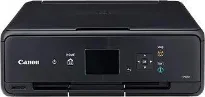
Users with the Canon PIXMA TS5070 model of the printer stand to enjoy fantastic print quality at a reasonable speed. For starters, this machine has up to 4,096 nozzles for printing, with their specific color uniqueness. In other words, some of the standard ink cartridges include the PGI-770 cartridge model for Pigment Black printing. On the other hand, it supports the use of the CLI-771 cartridge model for Cyan, Magenta, Yellow, and Black copies.
Canon PIXMA TS5070 Drivers for Windows
1fa591d3dc1571935ad8ed22fe440cfc0ce791c1475839f7bef653b7a2e215e7f2e01f5a377fb835a741da68a2bcdcb844e62c2010339c7a63f003b9ccf3b18ed7cb05f9d0c13d2e8a1467bbf7369bc63b646d4956d2e323bec32f02394f31228dd427942e8e31c574841b714286f9171dafe7b49dd781ec9b62ff0cc61cf1a415e26104a051d3f79061242bb8114e3d81f35bbe709d14bb07a6284eb01471d0Canon PIXMA TS5070 Drivers for macOS
6e081940896e1aba8fdb4ca931fba58ed3ade76ba77d72e883566c45c60c66345e60cfa425c30b11df53ff8473b832264ee0d6e441c2b530b0cfdb01f34219e59aac75db332f9035b7b5e241a71f91f8a7575f1865c67896b56c1826187315e45f364309390bda740c4b7be8a1a87f77a8a1041593e3f9eff3660824ae48c2427f1bf08b6f337d11528b4806c8d44f6a28f67a9d995160634eb7246094c07c1c05fd9c59ffd568e0c41d201e512443bdc7912d4404afb84f877bd377e5fa8c61Canon PIXMA TS5070 Drivers for Linux
3b298716ad8b806fad72ed52714838921dea6f84253446a02d0e669afbc13804559acc98851ecf86000724ee268b473818b395c6b87524dc0d82ead6263a6ab598ba823924fb7835d6f2697a2561e0e92c44b64fc10b6f8086a7bbbe5ee998eabb8d108b2c3557f3dc258d47b560ce96608a006ec7b052a630e0a5f911da2413da7fddf03d95b487b55795812c9a27a00aa027a8f3bbcc76ead54ce07108976bcfb2af683f1d1ed0431948967bae872798d8b75da9eac1bfbf30aa8394220ab0Canon PIXMA TS5070 Supported Ink Catridges
Ink Cartridge Black CLI-771, Cyan Ink Cartridge CLI-771, Ink Cartridge CLI-771 Yellow, Magenta Ink Cartridge CLI-771, Pigment Black Ink Cartridge PGI-770
The other cartridge options include the PGI-770XL model for Pigment Black and CLI-771XL model for Cyan, Magenta, Yellow, and Black. In terms of the speed of color printing, the simplex mode prints at approximately 9.0 pages per minute (ppm). However, when printing in black and white, the rate is up to 12.6 ppm. Similarly, printing on photo paper of 4 x 6 inches is at 39 seconds. The printable width for this machine, the Canon PIXMA TS5070, is up to 203.2 mm, which is approximately 8 inches.
The recommended printing area also allows a top and bottom margin of 40.4 mm and 37.4 mm, respectively. It supports various paper sizes such as A4, A5, letter, legal, envelopes, and photo sizes. Apart from standard sizes, the Canon PIXMA TS5070 machine also supports the use of custom sizes. On the other hand, the paper handling specifications include high-resolution paper, photo paper pro platinum, and glossy photo paper.
Otherwise, the machine supports the use of photo paper plus glossy II, photo paper pro luster, and photo paper semi-gloss. In terms of the paperweight support, the rear tray can hold a weight between 64-105 gsm of plain paper. This tray can accommodate the Canon max paper with a weight of not more than 300 gsm. Also, it has a dot count ink-end sensor with a manual print head alignment. Moreover, the machine uses a flatbed scanner type.
Technical Details
| Title | Canon PIXMA TS5070 Drivers |
|---|---|
| Device Type | All-in-one printer |
| Driver Version | Varies by driver and operating system |
| Available Downloads | Drivers |
| License | Free |
| Manufacturer | Canon Inc. |