
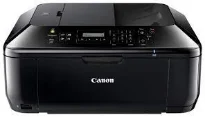
Canon PIXMA MX474 is an excellent multifunction printer that can produce outstanding results from printing, scanning, copying, and faxing. Beginning with the copier function, the rate of creating the first copy page is about 24 seconds per page. However, subsequent pages come out at the speed of 4.7 images per minute (ipm) through the main tray. When working through the ADF for continuous copying, the rate of work is 4.3 ipm.
Canon PIXMA MX474 driver Downloads for Microsoft Windows 32-bit – 64-bit and Macintosh Operating System.
Canon PIXMA MX474 Drivers for Windows
a3faf3c5c12c1b410b9543e0be67128fffcf8dc763edc58937b860a50ef00731da604716dac40d76d5a43f3da3d3334212b40cbc43ea5078dbd2dd86170b4354179ab0c08b66e0614cbbeef02e3b760889a018ef184818c244678b71025465528dd427942e8e31c574841b714286f9171dafe7b49dd781ec9b62ff0cc61cf1a415e26104a051d3f79061242bb8114e3d81f35bbe709d14bb07a6284eb01471d0Canon PIXMA MX474 Drivers for macOS
8a1898163b374122f9717228b253603419540afe23b9867d4b3606462f8230409e9d4cf4eaa36f1857b34a983119736356d4e77f5dde0e27f1ad3bee0053d090448ca4536569eb901249933f91c3f6b6b38698ed64d95309c2540a9dae76a71da8340f792922d6d8ce58acfacaa640a184cc236d45f9f9eb85e6237117f09444bbf94771ae35ec8259425dc3a5a248142c7f4d3cf4336123ceb8ba9ccc96beb54723d4cf96243560e9216345405cbd33273c50f9d1733a3335b1f562e279875985daff0c4741ebf8ffcbcaf83ee991a78adbb44cdf280eaa56074d866f0ab2cca9a4a22da70ba75a36832647f6c442468e2234c8c198a6d0bf2ecd0794b89556Canon PIXMA MX474 Drivers for Linux
d173883f280d568a701ab0d278f95f0fba266ed9d44969f534147144b4804506fc4b29a051b5d76f59c6529dd52c89b173211e25a82bdfc03f65f83e18d9ca230cff37fe6684dcfeb12a7350fb94cb5dda055b18c9987bbd32259320d46fc598d853d6ed349ff866ee9d34159a7c8695db351de3fb923f5eacec4df8182403a93eb63c4b3383d7a760a6501c917d3e64b52a3ccaf3643195e1b0d7b754f8dd2e36ff9510b2ee30bcda7c7a49fa72583555fcd3ee5b8d023e40d8702c941531a1Canon PIXMA MX474 Ink Catridge Details
Cyan, Yellow, Magenta Ink Cartridges CL-441, PG-440 Black Ink Cartridge
Furthermore, this Canon PIXMA MX474 printer function supports multiple copies between 1 and 99. Also, it can reduce the size of the output copy to 25% of the original document. On the contrary, it can also enlarge the output copy size to 400% of the original document size. Some other related features to copying include document copying, photocopying, fit-to-page copying, and borderless copying. Users can also adjust the copy quality settings to be fast, standard, or high.
In terms of faxing specifications, the appropriate component is a Super G3 feature that supports color faxing. Then, the faxing resolution depends on whether the document in the transmission is in black and white or color. If the transmitted text is black and white, the faxing resolution is about 300 x 300 dpi. But when a color document is in the faxing process, it is about 200 x 200 dpi. In any case, the faxing memory can store up to 50 pages of documents.
Under scanning specifications, it uses the flatbed feature that also has a contact image sensor (CIS). Besides, the machine Canon PIXMA MX474 can also work through the automatic document feeder (ADF) while producing a resolution of 1200 x 2400 dpi. At the same time, the scan speed for A4 sheets is approximately 15 seconds per page. Besides, the maximum document sizes that can work through the scanner include A4, letter, and clean sheets.
Technical Details
| Title | Canon PIXMA MX474 Drivers |
|---|---|
| Device Type | All-in-one printer |
| Driver Version | Varies by driver and operating system |
| Available Downloads | Drivers |
| License | Free |
| Manufacturer | Canon Inc. |