
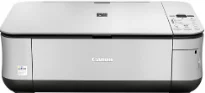
Suppose you are looking for a PIXMA printer model with tremendous ability to perform multiple functions. In that case, the Canon PIXMA MP250 model is a great choice. This machine also has a thermal inkjet print technology that ensures maximum production under similar conditions. Similarly, the black documents print at 7.0 images per minute (ipm) at the ESAT mode. On the other hand, color documents print at a rate of 4.8 ipm.
Canon PIXMA MP250 Drivers for Windows
26df363d922f43055fb287cb7c9a12bcddf8177fbaa0cb368b417c67a216896a80727481f3738274cbb468be6adc54d90853273b90e266f93cb619c60af3e28fCanon PIXMA MP250 Drivers for macOS
70b10c0019879f6ba16c6a313c5f46ebe66eede7102d8b27487dd8c18369047cd3314d97ff0695719d30453e634ed6bc7c38b3fb7061e9a8422adab2e39047b84c6c7b1549b8c400addc5d2bd2454b01dc8cff567bb17e2343240d9cba201d6aa0467f8af224eeb49e3b0f3b00e7b6055293b55de7bc13b2e01c7edc7f7d2d585676576ac59bcf010230b04e385525a8eaa737c040a6f5f502735a087016c3ffCanon PIXMA MP250 driver Downloads for Microsoft Windows 32-bit – 64-bit and Macintosh Operating System.
Ink Cartridge Details: CL-211 Color Ink Cartridge, PG-210 Black Ink Cartridge
However, borderless photo printing runs at a rate of 56 seconds per page. Moreover, the Canon PIXMA MP250 printer system comprises 1472 nozzles that can produce the best yield of output. The total nozzles consist of 1152 for color printing and 320 nozzles for black document printing. The machine uses a minimum ink droplet size of 2 and 5 picolitres under standard conditions in terms of the number of nozzles. It is compatible with both standard and custom sized papers.
Examples of the standard paper sizes include photo paper sizes, letter, legal, and US envelopes. Furthermore, the average print resolution is 600 x 600 dots per inch (dpi). On the other hand, the maximum print resolution is up to 4800 x 1200 dpi. When copying, this Canon PIXMA MP250 device can produce the first copy output only after 39 seconds approximately. The other copy-related features include borderless copy, fit-to-page, and multiple copies to reach 1 – 99 copies.
As a multifunction device, it can also scan documents using the flatbed scanning component. Besides, it also possesses a contact image sensor (CIS) element for best productivity. The average scanning resolution at the optical level is about 600 x 1200 dpi. On the other hand, its interpolated resolution is up to 19200 x 19200 dpi. Some scanning-related features include the gutter shadow correction and the push scan.
Technical Details
| Title | Canon PIXMA MP250 Drivers |
|---|---|
| Device Type | All-in-one printer |
| Driver Version | Varies by driver and operating system |
| Available Downloads | Drivers |
| License | Free |
| Manufacturer | Canon Inc. |