
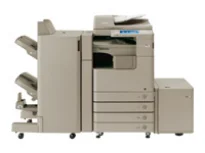
Canon imageRUNNER ADVANCE 4051i is a fantastic choice of printer with exceptional quality print output and great speed. As a digital multifunction printer, it has a modern imaging system with unique functions. These essential functions include scanning, copying, printing, sending, and storing information. Faxing is an optional feature for this machine, and when it is included, it has up to four lines. On its operational panel, there is an 8.4-inch (about 21.3 cm) SVGA full-color TFT screen.
Canon imageRUNNER ADVANCE 4051i Drivers for Windows
202db26bfac5b993cbcd6b9a40ebec8f95bad912033961104a26fc93f495460b60acc9b516cddc1d2625b8d211e60d8167965f15a755f665c4732a2d82024d0e4440d38430f90fcffc716e1b21f6acd10e0c1f5fdaa4bfcfdb4bcd957fcf89bcc60ae7abde74362ee1fc65c30bd9d6dbd210613ae7713e332cb28ca73d2602cebf31a4352cf32fa0d8e891013683895e8847cd8e45ec7e67cee6cbd139d15bf404d2e8b6f97ecdbf6149ef728dccd1e27a7ad604327a8fa2972b7d5b6323ac329a1afa2c3e1e35b01b97ed884bddd23829d707c44539bca6ece74547b87abae3b1a5520fb7f652b0e9ee4b4a83e072327625e52ff281fbe0a70989f7ea07e5b04a9a1df9c5994c09b491bea55250c3a9803402f7cff710cb623807b64594e728c1bfad159d62fab63862a6fdf792c13be08ec542d9147d3c5d189b92cf117f05443586ca6d538a0ef5ddea5cb22db9c19a6e312885460e262c69793b2ffdd0e8e10fae91cdf20194edba025fa9bc08f0cee2ad0faaf22d9a8d30edde8f002cff9392ac4854b6611280a41af3b0273a86f621eaf21a1b98f60bb72df9a27a75080f9c6406c46b234f582a575d1581efe532fa405c5390a18408e0a3cd074c96119ff9d626f727260aac636225ad851eaf6cf3b03f80e18decd2f38217d4eae456d978ee6c4172ea568d6aae8fd3e874fa2096bf93ff90717e4fe34550fd75e3858ca59880d1cb5901be647cdf1caea23c100983180f08882aa439e2bb80f0478b484d887fc334579b3dc3a8bc75da393a9e3965472a7d23778e61bd2de5b0bee29e0a235803be9f47a5d243d9335d0f9156f4db43c0d73229137365945e3a335e0deff56a0148d7027b8877556b7745d42c5813c7817e149c0897f3f537e54418cb339db25c05a3beb421ad1e31ab9601f64af4d7f5ac81885c067d86673faafb18012b4e3d9f4e36620ad4a72652f692fb8084fdd104e565bfabf3a44a89702b649bf8e02d19224f1c9760e1023a124b469a28dfbdcda08131b07139dd8367ddbd8828daab14ec56a9e38bdea36fa9bf64ef4b79026cfa955cc0c1e777b97ad1181f97381f88da4646c99915f293cfc6347d9ad16c7e8bfb11887a4c7cb32c3bCanon imageRUNNER ADVANCE 4051i Drivers for macOS
042821d27cddff8d35489be405be6fb6758a74e2357dcf8b86a6decc26d7aaefb9037c1d57b4057417612c80a9f29487bb47edfb0266ba96c153717b6717b88cfe736014202dd4dc2cc4b5618076a08306ebd2cadd738ee8c501bc1619fc19e75b8f8de010495b58464dd89bf0ec72e21a931f7476ebec8cf8c194361052d657804989950b94f64b85160213d11a5259c082d1312c1f627a0812ee349ad6245f79b3e920a4196ee4aaf6d17c5a095266ecf44e51626bd2902b01fa785dcd4075602bdd48468bf971d46227aeb5a5e80268b4d63683acc1033092bf82e239f06404379ee4276dcb51d3d98f083a64cb6f006f980ebc7cfff7f3b862d6b83fb0ad0eb111d5cf4d5c62d6b9284027ec6281e368fed92dad0a18812530e0bc4faebe61f0115a742ccd592c97a829fdce66fb3936ba20e2c75c3a64b8fbf107dc5ff086d5330d84af4dcc7458630c4999aae2495eebf5e1e3c6688e6e7c0453cb25a1317cf79acc2b5c650f2d0487297a075500cf16bac82b4995036f450d7eb267a83cac8d47a0bb1580e74b492bc876858781092e8fae8a009946dc72a2194c0ca96b581313eec6df01b8ad51715b70513f5b2a2cb26467a41d34966d7b57f74f96c98999b876d4bc8928e9adbfd33748039773dbb01850e711679363ae3e93785b6e200a3b567a0471dfeff9cac88b8064afea21461705494bab47c96ceb7ebad43accb0f153300092a2ee312825c851035f1c66d65dafd67c77e2d4fbcd27c13a312dad7b42625ee423180149805c7ec4e10d238d7ee98b777e766374df0576c837c7892368c2313a0619c97b4f71f32be34757bfcc84538a957d6f23e43e81f04c12283382997a0a253b5b7bedae90cf797892d245c51f896cbbc7eaf39f0d5bab8f0f303177d8c2129a2a2db2b478c6b63e40154d669f8d01041b4f7afcfbb1afa07a120e13f388f25264155b97228b6378ddc7bc4138e34904c730a8b43dcb0297641744ea447acd804af112d0693e6588ba52e03feaf0d3150446eb3e84f501a221888cc3651a64f633e461870d1e2d0cce0ef54abb9c8317ca085ad21964400f046433591f4a0ff3c99e03208e8383398907c9703634230bd5670b241b6694292469e0acf79d6f42d1ee69f08969d05241d73a3b0845a32aaa2fe1c08f5d319819327b889a34a931905184cbeb1e9c986e5d635fa77c88f5de1e424c308822777e10690dcebdae80b6ec50e7bed2b28b71ca4cf9315646912ab2ad21c066702b8d833f5f41ec87cd5b357b1b9ddd3bb3d1b09a3768321db602239d7774929dd3f1b1c7dc175ab7cd4bb929f902c55966150a6a0273dbb36ccad0f146006aCanon imageRUNNER ADVANCE 4051i Drivers for Linux
29e2380e21bda8c31f8c08435a2ba49cba61c13abfa47ba78081a9b0e55df333Canon imageRUNNER ADVANCE 4051i driver Downloads for Microsoft Windows 32-bit – 64-bit and Macintosh Operating System.
Toner Cartridge Details: CEXV38 Toner Cartridge Black – Up to 34,200 pages
Under the scanning feature, it runs on the network TWAIN standard scan component. Besides, it also has a scan utility in the form of color network ScanGear. The image server memory by the standard is about 1 GB plus 256 MB of RAM. However, the optional memory size is 512 MB of RAM Hard Disk Drive. The Canon hard disk drive has a standard space of 80 GB while the maximum is 250 GB. The connectivity includes a RAID1 Network interface comprising wired and wireless LAN ports.
The wired LAN has the 10/1000Base-T and 1000Base-TX, while the optional wireless component has IEEE 802.1x. However, the additional connectivity option is the standard USB 2.0 hi-speed host and device port. When printing on A4 paper, the work rate of the Canon imageRUNNER ADVANCE 4051i printer is up to 51 pages per minute (ppm). On the flip side, the A3 paper size runs at a speed of 25 ppm. When using an A4R paper size, the print rate is 37 ppm.
At the same time, the first copy out time for letter size is about 3.7 seconds. The multiple copies range between 1 and 999 copies, while the magnification is between 25% and 400% in gradual increments. The optimum resolution for this procedure is about 600 x 600 dpi.
Technical Details
| Title | Canon imageRUNNER ADVANCE 4051i Drivers |
|---|---|
| Device Type | All-in-one printer |
| Driver Version | Varies by driver and operating system |
| Available Downloads | Drivers |
| License | Free |
| Manufacturer | Canon Inc. |