
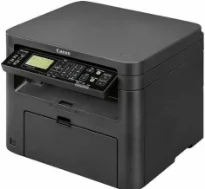
The Canon imageCLASS MF4720w model of printer is a monochrome printing device that can carry out three functions. The functions include printing, copying, and scanning documents at optimum performance. Its rate is up to 23 pages per minute (ppm) when using A4 paper for black and white printing. The print resolution is about 600 x 600 dots per inch (dpi) with the print language of UFR II LT. The first printout time is approximately 6.0 seconds after issuing the command to print.
Canon imageCLASS MF4720w Drivers for Windows
9bc3302be36e650809a76c6c34a3cf448cc7efc4cc49b895e248c4d42a4f866d9bc3302be36e650809a76c6c34a3cf448cc7efc4cc49b895e248c4d42a4f866d4d55a4a3e3f5a130bc7a9ccfc5f72f91edf71646e99efe25e959fc74157e973fCanon imageCLASS MF4720w Drivers for macOS
96a508b8817dcf2f4b7b59ad21e195a640c540ff08a6411639aa7834d23e0743cb41803f7db3dba7467715a8b0eb892c101e0c4c2dd082f285dfd820d8f432a3b6ddb33c456e76b77c69654f2216908bce41d1c2f4c7b496f268dd5603748e0935223b2977d71ab373eafd6f14f28daa933cd2dcdc4b0d818da4a4432b143668d5f10278e0dd91a898757299adb4a566e5f14e6ad073c885da268768b7b8172eff5d80d992a0f8b003104ffdc1bdf36bfe8bce0aa49cce77b27cdc9a95a5776c02735f008f6d8f5882c2824e3f2b83f7ccf7de77a1e3cca3f3007e0d40da0aef6708a180dad9484c82047dc4624ec4b3dd3438231e6ac5cbcdba793755e1ddb45efcaeccd8b1f1103d2bb966199a47fc50f0116996d987bd51178d61474c21518a9fe8a3ad9ee02fb65e10e05eda1e6d8e6ba268fa987a6e164d5ba661bb1240917e7c7089148ed46d637656f66159b2042287e9084b2b921ae5b5f5c0eb0e48da6c9cbd85a75754061053b0cd0086f0297ea2f9d52a2bb0056fff1438bcff1209431107d2b98a5c1a3d4ae6141590e902abf12a5f16be1d69712e8cfe98455935dc19aa61aba625226444a79ce3488bb61f99b0c653d1abf054c9b471d5a1b3e65a67c44f07e8c6ecf20e167ae2d83d355023809358287d3a2badbce65075856321f7ffd7900bcf8e4b8ce99f0d3d7af91556b836e302306ae8a25a2e16df9de6a48ab862ab2fa01c7793bae9776d4de130b89fe50e189ff8c78d1e5fa6183d360e961225a3a218f8f019abb06cafb6699a0ae2279c20467a32e972a2b98b6dCanon imageCLASS MF4720w Drivers for Linux
dfd33db96aacd96ba06c0f5bfa11fa9f5d368ef520100c6e5abf900539592e7eCanon imageCLASS MF4720w Supported Toner Catridge
Black Toner catridge 328 : Upto 2,100 Pages Yield
Copying is at the rate of 23 CPM when using A4 paper, while the resolution is also 600 x 600 dpi. The scanning also has an optical resolution of 600 x 600 dpi but enhances it up to 9600 x 9600 dpi. The enhancement is possible through the use of the software. In terms of the paper specifications of the printing machine, the input tray can hold 250 sheets of plain paper. But in the multipurpose tray, the maximum capacity is just one sheet, making a total of 251 sheets.
The standard interface options for the printer usage include a wired USB 2.0 hi-speed port. Another alternative is the 10/100 Base T and Base-TX Ethernet network ports. It also supports a wireless component that provides for a Wifi 802.11 b/g/n infrastructure mode with WPS easy setup. This Canon imageCLASS MF4720w machine can also work with mobile printing technology, where the internal memory is 128 MB.
By physical dimensions, the width of the machine is 390 mm, while the depth is about 362 mm. It also has a height of 301 mm with a closed cassette. The compatible toner is the Cartridge 328 model. Users can also note that this machine can print up to 8000 pages of print in a month. But this is the very maximum capacity of the device.
Technical Details
| Title | Canon imageCLASS MF4720w Drivers |
|---|---|
| Device Type | All-in-one printer |
| Driver Version | Varies by driver and operating system |
| Available Downloads | Drivers |
| License | Free |
| Manufacturer | Canon Inc. |