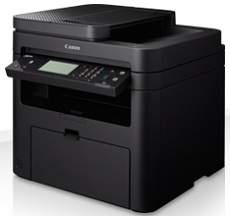
This machine contains one essential consumable, the Canon Cartridge 737 model, which can print up to 2400 pages. It also produces a sound level of up to 51 dB when the machine is active, while the quiet mode has 47 dB. At standby mode, the noise from the device is inaudible. According to the power source, the device supports a voltage range between 220 and 240 volts with a frequency of 50/60 Hz.
Canon i-SENSYS MF229dw driver Downloads for Microsoft Windows 32-bit – 64-bit and Macintosh Operating System.
Supported Toner Cartridges: Toner Cartridge 737 Black – Upto 2400 Pages
Canon i-SENSYS MF229dw Driver for Windows
Supported OS: Windows 11 (64-bit), Windows 10 (32-bit), Windows 10 (64-bit), Windows 8.1 (32-bit), Windows 8.1 (64-bit), Windows 8 (32-bit), Windows 8 (64-bit), Windows 7 (32-bit), Windows 7 (64-bit), Windows Vista (32-bit), Windows Vista (64-bit), Windows XP (32-bit), Windows XP (64-bit)
MF Drivers for Windows 32-bit
Supported OS:Windows 10, 8, 8.1, 7, XP, Vista 32-bit
119.77 MB
MF Drivers for Windows 64-bit
Supported OS:Windows 11, 10, 8, 8.1, 7, XP, Vista 64-bit
119.77 MB
Patch for Network Scan and USB Scan for Windows 32-bit and 64-bit
Supported OS:Windows 10, 8, 8.1 32-bit and 64-bit
7.72 MB
UFR II – UFRII LT V4 Printer Driver for Windows 32-bit and 64-bit
Supported OS:Windows 11, 10, 8.1 32-bit and 64-bit
114.31 MB
Driver and Software for Mac OS
Supported OS: macOS Sequoia 15, macOS Sonoma 14, macOS Ventura 13, macOS Monterey 12, macOS Big Sur 11, macOS Catalina 10.15, macOS Mojave 10.14, macOS High Sierra 10.13, macOS Sierra 10.12, OS X El Capitan 10.11, OS X Yosemite 10.10, OS X Mavericks 10.9, OS X Mountain Lion 10.8, OS X Lion 10.7, Mac OS X Snow Leopard 10.6, Mac OS X Leopard 10.5
TWAIN Scanner Driver and Utilities for macOS
Supported OS:macOS 10.5 to 10.11
69.50 MB
MF Printer Driver and Utilities for macOS
Supported OS:macOS 10.11 to 12
22.21 MB
Scanner Driver and Utilities for macOS
Supported OS:macOS 10.12 to 12
86.90 MB
Fax Driver and Utilities for macOS
Supported OS:macOS 10.12 to 12
21.07 MB
Scanner Driver and Utilities for macOS
Supported OS:macOS 10.11
84.36 MB
Fax Driver and Utilities for macOS
Supported OS:macOS 10.11
15.10 MB
MF Printer Driver and Utilities for macOS
Supported OS:macOS 10.10
22.21 MB
Scanner Driver and Utilities for macOS
Supported OS:macOS 10.10
84.18 MB
Fax Driver and Utilities for macOS
Supported OS:macOS 10.10
14.48 MB
MF Printer Driver and Utilities for macOS
Supported OS:macOS 10.9
22.19 MB
Scanner Driver and Utilities for macOS
Supported OS:macOS 10.9
84.31 MB
Fax Driver and Utilities for macOS
Supported OS:macOS 10.9
15.21 MB
MF Printer Driver and Utilities for macOS
Supported OS:macOS 10.8
22.09 MB
Scanner Driver and Utilities for macOS
Supported OS:macOS 10.8
81.36 MB
Fax Driver and Utilities for macOS
Supported OS:macOS 10.8
14.23 MB
MF Printer Driver and Utilities for macOS
Supported OS:macOS 10.7
19.80 MB
Scanner Driver and Utilities for macOS
Supported OS:macOS 10.7
67.03 MB
Fax Driver and Utilities for macOS
Supported OS:macOS 10.7
12.18 MB
MF Printer Driver and Utilities for macOS
Supported OS:macOS 10.6
47.25 MB
Scanner Driver and Utilities for macOS
Supported OS:macOS 10.6
84.89 MB
Fax Driver and Utilities for macOS
Supported OS:macOS 10.6
37.79 MB
MF Printer Driver and Utilities for macOS
Supported OS:macOS 10.5
34.36 MB
Fax Driver for macOS
Supported OS:macOS 10.5 to 10.11
23.72 MB
Driver for Linux
Supported OS: Linux (32-bit), Linux (64-bit)
UFR II – UFRII LT Printer Driver for Linux
Supported OS:Linux
69.88 MB
Specifications
On the other hand, the machine’s maximum power consumption is relatively less than 1300 watts at best. Inactive printing, the approximate power usage is less than 570 watts, while the sleep mode uses 1.7 watts. It also has a standby mode power consumption of fewer than 5.8 watts according to the standard electrical consumption rating. At the same time, the typical electricity consumption (TEC) is about 0.9 kWh per week.
Furthermore, the maximum duty cycle for the machine is up to 10,000 pages in a month. It also has an internal shared memory of up to 256 MB of RAM. The device has a control panel with a 6-line display on a liquid crystal display (LCD) touchscreen in black and white. In physical dimensions, the machine’s width is 390 mm while the height is up to 360 mm. besides, it has a depth of 448 mm while the weight is 13.1 kg.
In a typical operating environment, this machine supports a temperature of 10 and 300C. The environment’s relative humidity should be between 20 and 80% with no condensation. In its main input tray, the machine can hold up to 250 sheets of plain paper. On the other hand, it will take one sheet at a time in the manual feed slot. Whereas it also has the DADF tray that can take 50 sheets of plain paper. Finally, the output tray will accommodate 100 sheets of printed paper.
