
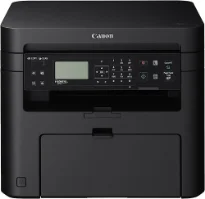
Printing with the Canon i-SENSYS MF211 printer model has a rate of up to 23 pages per minute (ppm) for A4 paper size. Simultaneously, the machine’s printing method is the monochrome laser print technology for the all-in-one function. It also has printing, copying, and scanning features as the available functions. It has an average print resolution of 600 x 600 dots per inch (dpi). Conversely, the maximum print resolution is up to 1200 x 1200 dpi.
Canon i-SENSYS MF211 Drivers for Windows
5cd1cadb9f83d55962db40829494cdd21a33756ed1e3ef2808f68ee860daffe85cd1cadb9f83d55962db40829494cdd21a33756ed1e3ef2808f68ee860daffe804d2e8b6f97ecdbf6149ef728dccd1e27a7ad604327a8fa2972b7d5b6323ac324d55a4a3e3f5a130bc7a9ccfc5f72f91edf71646e99efe25e959fc74157e973fCanon i-SENSYS MF211 Drivers for macOS
b6ddb33c456e76b77c69654f2216908bce41d1c2f4c7b496f268dd5603748e09db4bd12b92b8a2e9c7a25ac0d3bae568b640c30b1739dbb30a4fa5b89a977d2cd5f10278e0dd91a898757299adb4a566e5f14e6ad073c885da268768b7b8172e35223b2977d71ab373eafd6f14f28daa933cd2dcdc4b0d818da4a4432b143668ff5d80d992a0f8b003104ffdc1bdf36bfe8bce0aa49cce77b27cdc9a95a5776c02735f008f6d8f5882c2824e3f2b83f7ccf7de77a1e3cca3f3007e0d40da0aef6708a180dad9484c82047dc4624ec4b3dd3438231e6ac5cbcdba793755e1ddb45efcaeccd8b1f1103d2bb966199a47fc50f0116996d987bd51178d61474c21518a9fe8a3ad9ee02fb65e10e05eda1e6d8e6ba268fa987a6e164d5ba661bb1240917e7c7089148ed46d637656f66159b2042287e9084b2b921ae5b5f5c0eb0e48da6c9cbd85a75754061053b0cd0086f0297ea2f9d52a2bb0056fff1438bcff1209431107d2b98a5c1a3d4ae6141590e902abf12a5f16be1d69712e8cfe98455935dc19aa61aba625226444a79ce3488bb61f99b0c653d1abf054c9b471d5a1b3e65a67c44f07e8c6ecf20e167ae2d83d355023809358287d3a2badbce65075856321f7ffd7900bcf8e4b8ce99f0d3d7af91556b836e302306ae8a25a2e16df9de6a48ab862ab2fa01c7793bae9776d4de130b89fe50e189ff8c78d1e5fa6183d360e961225a3a218f8f019abb06cafb6699a0ae2279c20467a32e972a2b98b6dCanon i-SENSYS MF211 Drivers for Linux
29e2380e21bda8c31f8c08435a2ba49cba61c13abfa47ba78081a9b0e55df333Canon i-SENSYS MF211 driver Downloads for Microsoft Windows 32-bit – 64-bit and Macintosh Operating System.
Supported Toner Cartridges: 737 Black Toner Cartridge : up to 2400 Pages
However, the maximum resolution is possible through the automatic image refinement (AIR) component. The first printout time is about 6 seconds or less from the standby mode, and the machine supports UFRII LT print language. The supported margin for envelope paper size is about 10 mm for all four sides in terms of the print margins. On the other hand, when different standard sizes are in use, the print margin is about 5 mm from all four sides of the paper.
The Canon i-SENSYS MF211 printer’s optimum duty cycle is up to 8,000 pages in a single month at optimum performance. At the same time, the internal memory of the device is up to 128 MB of RAM. But it also has a control panel of a black and white display with a liquid crystal display (LCD). This display component shows five lines. Furthermore, the machine has a width of 390 mm while the depth is about 441 mm. It also has a height of 312 mm.
The machine has a net weight of 10.1 kg, which is most suitable for both office and personal use environments. In a typical work environment, the temperature of the domain is between 10 and 30°C. On the other hand, the relative humidity is between 20 and 80% with no condensation.
Technical Details
| Title | Canon i-SENSYS MF211 Drivers |
|---|---|
| Device Type | All-in-one printer |
| Driver Version | Varies by driver and operating system |
| Available Downloads | Drivers |
| License | Free |
| Manufacturer | Canon Inc. |