
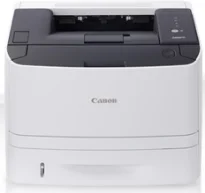
The Canon i-SENSYS LBP6310dn printer model runs at a speed of 30 pages per minute (ppm) for A4 paper. Its printing method is a monochrome print method for black and white printing for optimum yield. The standard print resolution is up to 600 x 600 dots per inch (dpi), the average quality. However, with the aid of an automatic image refinement (AIR) print component, the machine has a maximum resolution of 2400 x 600 dpi.
Canon i-SENSYS LBP6310dn Drivers for Windows
de419a6f250ec919f0c0cefa98e4862c40783a2199eade400af033715042f54d7be0f4eb3d38d3be38b78af735f7f5e186fdb0a4989c038217c4f3f4264a1614Canon i-SENSYS LBP6310dn Drivers for macOS
447325e9ba81034ea9d6b1b0a9594158c269e804ede9ef644e8657ca482bc8006ab22eb02be80fd6182460dfcacc024cc2c02e2fc2696c3f0701309076d8979f75341c120a4cee3635780d875ee209afe6d175153596f36a176980870d6ca57eCanon i-SENSYS LBP6310dn Drivers for Linux
8565a2fdc4f452bb8cf97ceadadd6614d12eac73e253ac6d59e61b8abae941beCanon i-SENSYS LBP 6310dn driver Downloads for Microsoft Windows 32-bit – 64-bit and Macintosh Operating System.
Supported Toner Cartridges
719 Black Toner Cartridge – Upto 2100 Pages
The warmup time for this machine is approximately 10 seconds or less from the power on stage. It also has a first page output time of about 6 seconds or less. In comparison, the machine has a maximum print yield of up to 25,000 pages in a month. The print margin is up to 5 mm for all four sides, including the top, bottom, right, and left sides. The optimum yield is up to 250 sheets of plain paper in terms of the standard paper input capacity.
In addition to the main tray, it also has a multipurpose tray of up to 50 plain paper sheets. It also supports an optional tray that can hold up to 500 sheets of plain paper. However, the paper output tray can hold up to 150 sheets of printed documents in a face-down manner. Canon i-SENSYS LBP6310dn supports standard paper types, including plain paper, heavy paper, transparent films, labels, index cards, and heavy paper.
On the contrary, the standard paper types include A4, A5, B5, A6, legal, letter, executive, 16K, monarch, and envelopes. Its supported media weights for the standard and optional trays are between 60 and 120 gsm. But for the multipurpose tray, the supported weight range is between 60 and 163 gsm. Double-sided printing is automatic, while the power voltage range is between 220 and 240 volts at 50/60 Hz.
Technical Details
| Title | Canon i-SENSYS LBP6310dn Drivers |
|---|---|
| Device Type | Printer |
| Driver Version | Varies by driver and operating system |
| Available Downloads | Drivers |
| License | Free |
| Manufacturer | Canon Inc. |