
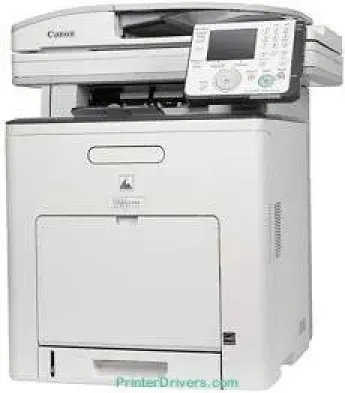
The Canon Color imageCLASS MF9280cdn model is a color laser printer with exceptional features for best performance. When this machine prints in color or black and white, the production rate is up to 22 pages per minute (ppm) for letter-sized paper. The average resolution for printing is about 600 x 600 dots per inch (dpi). On the other hand, the optimum print quality is up to 2400 x 600 dpi for the highest quality.
Canon Color imageCLASS MF9280cdn driver Downloads for Microsoft Windows 32-bit – 64-bit and Macintosh Operating System.
Toner Cartridge Details
111 Black Toner Cartridge, Toner Cartridge 111 Cyan, Magenta 111 Toner Cartridge, 111 Yellow Toner Cartridge
Canon Color imageClass MF9280cdn Drivers for Windows
3c2c2209ccadf3576199bd6c7ee911ee7d5ddb469f11c5c5b2d090de0304261d2812a063f47be0e662ab919e20b08c5c7f8af19ea02bfe71123c6546d0802e074b19a11189d06ab953c8960157e1058cf40c65fbfe7b35b52222102db4d22d73baaa11e8addccaf105739b35741e6fd6213af1b3fa41acb22e122b1b2eb44697d713d828cdebc7804384d9ae9e4272ca5bdc382062df9b7f362f61801111980e636afb70d89aad0eddbd50fb1d8a784344bf23a95c5f078a00be3d231680db8e57f0f872dd5399978d93341ed0cb55757a432d7fb27ad51a2da192a6b74d580ecc9fe8041f6b7403c0108aa3c9b9209210547ba60a10856077b549ca8eb5091d619b667d35e5321311eb164c1208530c41dc9e0ce5760b4f402d484aaf844cb3427b89bc8d04fad2cd44ff669aa188f9c594e14fa7a4377a6036d303db7140f33ae3a9bec19da4981fa9ffa55ea4f53d8846c5a1f2e740bf9ee2b1e5f1a7507a67848f2ffe82014020b49aa76457fe642a2f64a872ec988c6ab9971ee61ddd66ebb6942bb8085863a46395bb3dd10ea6a7bddb9f20737ac093b183549c03de690cbcdc48fadbe7ec928ffd8b05bb6813ea056ad9d4b3e7473fa76dd1f5d1de7284c3f334b0f856222b8eed352c7ba34b7b81539648effe54499b3e74fab8d5592816b22d74ab381bf8d3719a246e794f12b9833e403bbcafc5a91af26b5921e93acd1a7c5a8bc49946ef19a9e1300a8333e38708275a23898eba6951cfa0eda11323957bc0dfb873feb7615df02432e15cf188e7fe6cdcac00f6ac0d4566f71d208591d3c62613ef02343cfcd7f8c7c6b45dddefcf416acfa279ee14f3a9b8988489588dc560880fa58e7af3f4a0b67d115b55dfbf3ee02e20ba4e64f1a399d35ce34dce406f36dd4468fa4e86676ad211a0ebe5026fd2007168c92b420d7651718da3e0d2ed9e4a733cf17978feb753b4d1893c6592e3b445e0d563083f9f2a62814c49ae0caf9cce45a46e56a251fc5a3590abad2b4ce28b41d0bc591b89a0c2eaa283de1e130d72a4e6ac45bf80cc7be72fe4a2e2c826c4ef667dcec53563649bf8e02d19224f1c9760e1023a124b469a28dfbdcda08131b07139dd8367dd083c19754284db2ff3f9d1ccd9a9f544276e8cdf6dbf499bbd1b38a9b43ada816ab4cde98bfb0e091794c5c7559dabe695a1a51a6290bce5bd933cee4974b99fd71391ae208d0bd8009c2bd5bd3828d2bff8f394808ccf482e345c6adc373144a1d0b961fdd798587bb750d58bd88e2d4d862e5c59dbd8da495333aaf3a7cd41e28f9a1833e68475afc71d7ef976dd021c8b8cdf16b52839422c8e9cfc5b6ae9Canon Color imageClass MF9280cdn Drivers for macOS
8c3891f63d4e6b9d23a613adb34a803bd4b45593d9fc0ca658465a0aba1a7ff3a2f4cd0e35483928ff487a3267ea5c930711de5d487220a3d3402f65c263e8e6646aaa66b64a8416492c4abf846958b255a596204cbd7db738b975103f543f50120127e629c21787113c325d0a39041678f71d4a9f42e666ef90388f0c0584b569ef5f30da4c92762d2a5b614957892f1b542e16a07d53fec92f92bc3051fe328a61b1860bb1be1d4e708f1419f7202262e29fb743bd1a4b7674daa6b74fce96edd8dcff2593c749a946c421f8d3b7484ca2059b0e42799acf81f74ccc168efec5875b37125b8c8a32cad84148bab04417f7abf39551d213d21db0084be432cc90e2e6baaecf684360cf1130ec83b9d1c94718c339626db52f7b4688f9ce8f315c70ce408e9af249acb1d961605a3c4e4741913910cc53c3a562af0ca8c76e6e0297641744ea447acd804af112d0693e6588ba52e03feaf0d3150446eb3e84f5b3a91af1f32651926bea385706e66a9224b8471985df9e1f9d051d98d6da7b633d1cdceea84a542a2f3a87260766b5c9361b29b64316e7ff24d6a98a6826c68dcd403b42f9117b3534b580cc059e657ae4f18497b4b9c846bd39602446daae28f575641e457c67d6ab0291408154e09d5b5c40fee0413f8b74ebb8554db24d6fc18cb1be042fdd2ba53d1436d1118f2692f02d2b30388b52164994d355ae6aea22777e10690dcebdae80b6ec50e7bed2b28b71ca4cf9315646912ab2ad21c0669dd3f1b1c7dc175ab7cd4bb929f902c55966150a6a0273dbb36ccad0f146006a702b8d833f5f41ec87cd5b357b1b9ddd3bb3d1b09a3768321db602239d777492c0f30b290384f17a632ab8d1bb4aaeb3589d0088456996795300daf6874e757fce4e588538376ea06d8cebe6fcce2f0feef6a769b6be9f24e7f1db99f24bb06448161d9708c89c3e6582c1998ff8f43602df6e3a91aa8f4f1b5bfa1a7cd1078a95a8a167b29fa549e7cef6686d42491921d3db11307ee86a2b894730cbc5e9a7245023025e79196fe45e820e0d6ae054991fda6551b4a53e028cd1844354065fCanon Color imageClass MF9280cdn Drivers for Linux
b39c36f244b3a910c952a0b10342f846f5065c4decdbee1babc2505c65343f19Canon Color imageCLASS MF9280cdn Specifications
As a laser multifunction printer, it uses the Canon Cartridge 111 model. This model can also produce up to 6000 pages at the optimum yield. This capacity is a 5% coverage document capacity. Some of the other printer features include UFR II LT, PCL 5c, PCL 6, PS 3 emulation print languages. Different print modes include the poster, N-on-1 (which can reach 16-on-1), and scaling. The internal print memory is up to 768 MB of RAM shared memory.
The output resolution is up to 600 x 600 dpi with an average speed of 22 ppm in copying. The printer can also produce up to 99 copies from a single original document with approximately 13 seconds for the first copy page. Concerning the paper weight, the cassette paper type supports a range between 16 and 32 lbs. On the other hand, the multipurpose tray can take a paper weight between 16 and 47 lbs for the bond paper.
It can also zoom within a range between 50% and 200% for reduction and enlargement. The levels include 64%, 78%, 129%, and a maximum of 200%. In terms of the paper capacity, the main paper tray can accommodate 250 sheets of plain paper. But the multipurpose tray can hold up to 100 sheets of plain paper. When working through the platen glass or ADF, the maximum paper size is the standard type.
Technical Details
| Title | Canon Color imageClass MF9280cdn Drivers |
|---|---|
| Device Type | All-in-one printer |
| Driver Version | Varies by driver and operating system |
| Available Downloads | Drivers |
| License | Free |
| Manufacturer | Canon Inc. |