
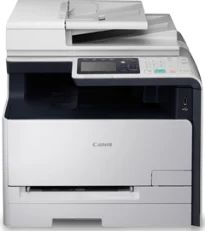
The Canon Color imageCLASS MF8280Cw printer model produces color documents with laser print technology with the top output quality level. In terms of print speed, this machine runs at a rate of 14 pages per minute (ppm). But this rate applies to simplex or single-sided print mode on letter paper size. It has a first print time of less than or equal to 18 seconds. However, this device supports the use of a host-based UFR II LT print language.
Canon Color imageClass MF8280Cw Drivers for Windows
53c1c830c9c2384e6fe1e44f2a69b22723781fe961fe80787ced5b88075bc32053c1c830c9c2384e6fe1e44f2a69b22723781fe961fe80787ced5b88075bc32004d2e8b6f97ecdbf6149ef728dccd1e27a7ad604327a8fa2972b7d5b6323ac324d55a4a3e3f5a130bc7a9ccfc5f72f91edf71646e99efe25e959fc74157e973fCanon Color imageClass MF8280Cw Drivers for macOS
b6ddb33c456e76b77c69654f2216908bce41d1c2f4c7b496f268dd5603748e09db4bd12b92b8a2e9c7a25ac0d3bae568b640c30b1739dbb30a4fa5b89a977d2caf80abbfffc6c226407dfc5c2ea7fe751fb9c52c56dd4bf9a5cb587899b1368f35223b2977d71ab373eafd6f14f28daa933cd2dcdc4b0d818da4a4432b14366879b3e920a4196ee4aaf6d17c5a095266ecf44e51626bd2902b01fa785dcd4075d5f10278e0dd91a898757299adb4a566e5f14e6ad073c885da268768b7b8172eff5d80d992a0f8b003104ffdc1bdf36bfe8bce0aa49cce77b27cdc9a95a5776c02735f008f6d8f5882c2824e3f2b83f7ccf7de77a1e3cca3f3007e0d40da0aef86d5330d84af4dcc7458630c4999aae2495eebf5e1e3c6688e6e7c0453cb25a16708a180dad9484c82047dc4624ec4b3dd3438231e6ac5cbcdba793755e1ddb45efcaeccd8b1f1103d2bb966199a47fc50f0116996d987bd51178d61474c215169ef5f30da4c92762d2a5b614957892f1b542e16a07d53fec92f92bc3051fe328a9fe8a3ad9ee02fb65e10e05eda1e6d8e6ba268fa987a6e164d5ba661bb1240917e7c7089148ed46d637656f66159b2042287e9084b2b921ae5b5f5c0eb0e48c5875b37125b8c8a32cad84148bab04417f7abf39551d213d21db0084be432ccddd1a155fe623f7f913e5bf860233ad73ccaaa5a5814b9b1e9353dd6501d88f7c5310bca335d137d5d319b3536e7bd3bca38355c1bd03236c03a8c33fc0acd3e0297641744ea447acd804af112d0693e6588ba52e03feaf0d3150446eb3e84f535dc19aa61aba625226444a79ce3488bb61f99b0c653d1abf054c9b471d5a1b3e65a67c44f07e8c6ecf20e167ae2d83d355023809358287d3a2badbce6507585cd403b42f9117b3534b580cc059e657ae4f18497b4b9c846bd39602446daae286321f7ffd7900bcf8e4b8ce99f0d3d7af91556b836e302306ae8a25a2e16df9de6a48ab862ab2fa01c7793bae9776d4de130b89fe50e189ff8c78d1e5fa6183d9dd3f1b1c7dc175ab7cd4bb929f902c55966150a6a0273dbb36ccad0f146006a360e961225a3a218f8f019abb06cafb6699a0ae2279c20467a32e972a2b98b6dce4e588538376ea06d8cebe6fcce2f0feef6a769b6be9f24e7f1db99f24bb064Canon Color imageClass MF8280Cw Drivers for Linux
d58796ee5518feee485119683cf7caa705668652803b8f0fb60177472ebe6d3bCanon Color imageCLASS MF8280Cw driver Downloads for Microsoft Windows 32-bit – 64-bit and Macintosh Operating System.
Supported Toner Cartridges
Toner Cartridge 131 Black – Yields approx 1,400 pages
131 Cyan Toner Cartridge – Upto 1,500 pages
131 Magenta Toner Cartridge – Yields upto 1,500 pages
Yellow 131 Toner Cartridge – Approx 1,500 pages
The print resolution of this machine, on average, is up to 1200 x 1200 dots per inch (dpi). However, it can produce document quality that reaches up to 2400 x 600 dpi with the standard paper size. Simultaneously, the compatible print modes include watermark, poster, page composer, and toner save. It also has an internal print memory of up to 256 MB for the shared memory.
Copying with the Canon Color imageCLASS MF8280Cw model also uses the color laser print technology. It also runs at 14 copies per minute (CPM) with letter-sized paper. On the other hand, the copy resolution is not more than 600 x 600 dpi with 256 levels of halftones. The original types for the machine include text, photo, and map types. This machine also has a warm-up time of approximately 23 seconds.
Furthermore, the Canon Color imageCLASS MF8280Cw model has a recovery time of about 8 seconds. However, the maximum number of copies reaches 99 copies from a single original document. The acceptable zoom range is between 25 and 400% with 1% gradual increments. Also, the maximum paper size is up to the letter size when copying through the platen glass. However, when using the ADF, the maximum dimension is for the standard size.
Technical Details
| Title | Canon Color imageClass MF8280Cw Drivers |
|---|---|
| Device Type | All-in-one printer |
| Driver Version | Varies by driver and operating system |
| Available Downloads | Drivers |
| License | Free |
| Manufacturer | Canon Inc. |