
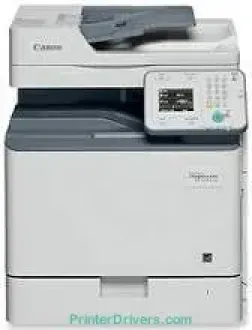
The Canon Color imageCLASS MF810Cdn machine has a color laser print technology to produce optimum productivity and value. The rate of printing with this device is up to 26 pages per minute (ppm). It takes about 11.4 seconds or even less to produce the first page print on letter-sized paper. The options include UFR II, postscript, PDF, PCL 6, PCL 5c, and PCL XL in the printer language. Besides, it also has a maximum resolution of 1200 x 1200 dots per inch (dpi).
Color imageCLASS MF810Cdn driver Downloads for Microsoft Windows 32-bit – 64-bit and Macintosh Operating System.
Supported Toner Cartridges
034 Black Toner Cartridge – Approx 12,000 Pages
Cyan 034 Toner Cartridge – Yields upto 7,300 Pages
034 Magenta Toner Cartridge – Upto 7,300 Pages
Toner Cartridge 034 Yellow – Yields approx 7,300 Pages
Canon Color imageCLASS MF810Cdn Drivers for Windows
43a8752b43088ebe8484d5f73d085521c14ef09cc987e173f67e887c4845db7543a8752b43088ebe8484d5f73d085521c14ef09cc987e173f67e887c4845db75c2ff714efdb87a28a77cb359576e87193080089d3b1f3a1532426dd820fab8b8daa246f770c700a3276783245c1c9d4a3a5c713831daab0ccda69ee1a272b33504d2e8b6f97ecdbf6149ef728dccd1e27a7ad604327a8fa2972b7d5b6323ac32484d887fc334579b3dc3a8bc75da393a9e3965472a7d23778e61bd2de5b0bee20f9c6406c46b234f582a575d1581efe532fa405c5390a18408e0a3cd074c9611c60ae7abde74362ee1fc65c30bd9d6dbd210613ae7713e332cb28ca73d2602cecc9fe8041f6b7403c0108aa3c9b9209210547ba60a10856077b549ca8eb5091d619b667d35e5321311eb164c1208530c41dc9e0ce5760b4f402d484aaf844cb3427b89bc8d04fad2cd44ff669aa188f9c594e14fa7a4377a6036d303db7140f33ae3a9bec19da4981fa9ffa55ea4f53d8846c5a1f2e740bf9ee2b1e5f1a7507a67848f2ffe82014020b49aa76457fe642a2f64a872ec988c6ab9971ee61ddd66ebb6942bb8085863a46395bb3dd10ea6a7bddb9f20737ac093b183549c03de690cbcdc48fadbe7ec928ffd8b05bb6813ea056ad9d4b3e7473fa76dd1f5d1de7284c3f334b0f856222b8eed352c7ba34b7b81539648effe54499b3e74fab8d55929e364d2f61030c452e4bc1fe021763f9104df7571c9f424ea1e6cb7d3ae3db10720c4746a3ae9e275062dca7e8ad87cd65fc39927feb844f0f05b8cf64ad571a2bc8d3788b40a988e601879c7178b38569e43ea26256cddb57d63fac655fdec0d4f501e637282f476f558da6d428a536f40bdaf69f972730f29ca6ed53bfe027041e132bc8cb51f82da4f68b9431414fb5a3421b8eccf71b772c16d24b7a185bb1077d07d7227f4ad228fb4e533fa207297ad682564f2a8f0fb15e49f3d2b9a636afb70d89aad0eddbd50fb1d8a784344bf23a95c5f078a00be3d231680db8e57f0f872dd5399978d93341ed0cb55757a432d7fb27ad51a2da192a6b74d580e8b2d031e1c899307fedb664b7c949b5113231a3bc33804940edba4d46a9e63c9d3f68345758fd01c81560c01fdf6ad127a5f0166efbc7c1d083ffbe4f0233e9e8489588dc560880fa58e7af3f4a0b67d115b55dfbf3ee02e20ba4e64f1a399d35ce34dce406f36dd4468fa4e86676ad211a0ebe5026fd2007168c92b420d76510a55ea956b579f4e4fe3d37b3fddabdbb01e72793edf360d280e28b4d5a96514127a64bf02ecdc820c150c92fecec39f7bc3c677dcbafd244cdba2a350e553ea718da3e0d2ed9e4a733cf17978feb753b4d1893c6592e3b445e0d563083f9f2a62814c49ae0caf9cce45a46e56a251fc5a3590abad2b4ce28b41d0bc591b89a04f08a7913e71af9f8194505c80240c0a25a08011f8663745eebc0a69dd852b40dee77f11940eb8142ef4e8e36eed4e7852ccfd0f133fe317d89ce81ca7288cf71323957bc0dfb873feb7615df02432e15cf188e7fe6cdcac00f6ac0d4566f71d208591d3c62613ef02343cfcd7f8c7c6b45dddefcf416acfa279ee14f3a9b8982816b22d74ab381bf8d3719a246e794f12b9833e403bbcafc5a91af26b5921e93acd1a7c5a8bc49946ef19a9e1300a8333e38708275a23898eba6951cfa0eda1115a0eef050560fb73b5da35f6c387e0b9f478c956dac5e5c10c75f32bb6a8599dd634996f64e26200ae0af0be2c9c73ac715167a5a5feb6800ac80c27e999eba70dbd063b2ed3fb3ea147fdbbef58438dbc77f626b0546a9020ff559ea2af446ab4cde98bfb0e091794c5c7559dabe695a1a51a6290bce5bd933cee4974b99fd71391ae208d0bd8009c2bd5bd3828d2bff8f394808ccf482e345c6adc373144a1d0b961fdd798587bb750d58bd88e2d4d862e5c59dbd8da495333aaf3a7cd41e28f9a1833e68475afc71d7ef976dd021c8b8cdf16b52839422c8e9cfc5b6ae94d55a4a3e3f5a130bc7a9ccfc5f72f91edf71646e99efe25e959fc74157e973fCanon Color imageCLASS MF810Cdn Drivers for macOS
edd8dcff2593c749a946c421f8d3b7484ca2059b0e42799acf81f74ccc168efe5c70ce408e9af249acb1d961605a3c4e4741913910cc53c3a562af0ca8c76e6e3d1cdceea84a542a2f3a87260766b5c9361b29b64316e7ff24d6a98a6826c68d22777e10690dcebdae80b6ec50e7bed2b28b71ca4cf9315646912ab2ad21c066c0f30b290384f17a632ab8d1bb4aaeb3589d0088456996795300daf6874e757f90e2e6baaecf684360cf1130ec83b9d1c94718c339626db52f7b4688f9ce8f31b3a91af1f32651926bea385706e66a9224b8471985df9e1f9d051d98d6da7b63f575641e457c67d6ab0291408154e09d5b5c40fee0413f8b74ebb8554db24d6f702b8d833f5f41ec87cd5b357b1b9ddd3bb3d1b09a3768321db602239d77749248161d9708c89c3e6582c1998ff8f43602df6e3a91aa8f4f1b5bfa1a7cd1078a917e7c7089148ed46d637656f66159b2042287e9084b2b921ae5b5f5c0eb0e48c5310bca335d137d5d319b3536e7bd3bca38355c1bd03236c03a8c33fc0acd3ee65a67c44f07e8c6ecf20e167ae2d83d355023809358287d3a2badbce6507585e6a48ab862ab2fa01c7793bae9776d4de130b89fe50e189ff8c78d1e5fa6183dc5875b37125b8c8a32cad84148bab04417f7abf39551d213d21db0084be432cc0297641744ea447acd804af112d0693e6588ba52e03feaf0d3150446eb3e84f5cd403b42f9117b3534b580cc059e657ae4f18497b4b9c846bd39602446daae289dd3f1b1c7dc175ab7cd4bb929f902c55966150a6a0273dbb36ccad0f146006ace4e588538376ea06d8cebe6fcce2f0feef6a769b6be9f24e7f1db99f24bb06402735f008f6d8f5882c2824e3f2b83f7ccf7de77a1e3cca3f3007e0d40da0aefCanon Color imageCLASS MF810Cdn Drivers for Linux
779606128c085e84db28c94698e6e8b6aab38cb7689c87eb971be40318e942baCanon Color imageCLASS MF810Cdn Specifications
The maximum print size for this machine is the legal-sized paper with support for duplex print. At the same time, it supports print modes that include the poster, booklet, watermark, page composer, and toner saver. Canon Color imageCLASS MF810Cdn also has a shared print memory that reaches 1 GB for quality output. Under copying, the copy type is the laser component, while the average speed is up to 26 copies per minute (CPM).
The original type of content that applies to this machine involves text, photo, or both. At the same time, the halftones for the device are up to 256 levels. It takes about 34 seconds to warm up the machine and get it ready for printing. However, the first copy out time is about 8.4 seconds for a black document and 10.5 seconds for color copying. Also, the recovery time from this mode is approximately 10 seconds.
When considering the maximum number of copies that the users can produce, this machine will make 999 copies. Similarly, it can zoom in or zoom out on the image output between 25% and 400% of the original size. Some of the other notable copy features include frame erase, memory sort, ID card copy, 4-on-1, and 2-on-1.
Technical Details
| Title | Canon Color imageCLASS MF810Cdn Drivers |
|---|---|
| Device Type | All-in-one printer |
| Driver Version | Varies by driver and operating system |
| Available Downloads | Drivers |
| License | Free |
| Manufacturer | Canon Inc. |