
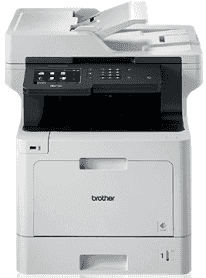
The Brother MFC-L8900CDW Driver largely determines the efficiency of the machine’s operations. For example, it influences the device’s top-quality printing, scanning, faxing, and copying functions. It works with 4x toner configuration and Laser print technology with a print resolution of 2400 x 600 dpi (dots per inch). At the same time, it supports duplex printing, and the first printout time is 15 seconds. Similarly, the monthly duty cycle is 60,000 pages, and the print speed by time for black and color is 33 ppm.
Brother MFC-L8900CDW Drivers for Windows
7a3e057a760eafd8edf3ce526753e7aa15fff319f36a5a2b03c0dcf7375ca2d4d670a9050bc6b1379cdcfb450680af4666f9ab13b98c0880caa98de986f3a5fbBrother MFC-L8900CDW Drivers for macOS
f3a27f3126f7b3b5a04e0481ad743564f6fd1d6e039ec33ec3c687af15a1aa0aab64878616f2d0ddbf65ea85e386b8e122bd5549079ad82012a8d47a21079c992b229ea56fe0606c51a04cf94f9d615a96308c25f6e7574d3490237b47e68261f639a05c8415e5edb9da1dcd29745857ece96ca3931975ea830ece1cf62783816a9ef2865964ff4918dd1441876a80485fb8c329df36aa8d6680deff2eecd53efd31c871c85b798d30dd6128e37831f7328660a5bf4a5798c789284cb73043f321b4c7490f1f5e8124a2f6298286e7488571da3235a47d6ec1774d3867cd159109d5f2ba205e580e431574c30a7ba6b9679c21d8babff3e0724c9c3f8be2fcb95a7267150b83ee885c1eaea15b7033b2cce24fd9c0ff9335ad5e5e43d2a93712Brother MFC-L8900CDW Drivers for Linux
5e67f32f09cec3d0c3cd5c040cb20bd3b9cf1147df081d4a703c9af01fbdcacbf9359c9cee1d2273f34abaac8f1f2a1c93ed525966a6d6cd764252450bb82207e268e47505a26267ad7872adc3480e5c0acda1c7d55ab50f16f0f81f5b292274178a4942189213a8cd4186f54ee9426fd0ec3595276fa55dd1bacf7dab77f17f027b73648722ac8c8eb1a9c419d284a6562cc763feac9740a2b75a683b0929727d7dcbe8349ae4d4ab816e4551017f2f1fd9fd6bf3f4f3c570fbd9576248dd9f4225e91dd7f7d0ba2a202f616b15b669be7800c271a7d25efed94191f71fc4508bd395b8a25a385eb4a5e2770d4b10b17735203006b7a90a6879a0ef69e5fe4df71dadda535bb90dbfaf88fd603897f96e8b09a2f3ae9bd4e2daafb925e896e24082d824222ec7a7646309260fd661387ca1aa5dc1ffe851db7bbefe5271b755Brother MFC-L8900CDW Specifications
Furthermore, Brother MFC-L8900CDW supports 1x input tray and output tray, and the media support includes envelopes. In addition, the input tray can hold a minimum media size of 4.1 x 5.8 and 10.4 x 14.7cm, while the maximum media size is 8.5 x 14 and 21.6×35.6cm. Furthermore, the input tray can hold 250 sheets, and the output tray can hold 150. At the same time, the supported media weight on the input tray 1 includes 60 to 105 gsm and 16 to 28 lb.
As for the scanning functions, it supports a Flatbed scanner with Automatic Document Feeder (ADF) with color and Grayscale scan modes. Meanwhile, the maximum resolution supported on a flatbed includes 2400 x 1200 dpi (hardware), while ADF has 1200 x 600 dpi (hardware). In addition, it supports duplex scanning, single pass duplex, automatic image corrections, and 1x Contact Image Sensor (CIS). Similarly, the supported file formats include BMP, DOCX, JPEG, PDF, PNG, PPTX, RTF, TIFF, WPD, XLS, and XPS.
Moreover, ADF can hold up to 70 sheets while the supported media weight includes 64 to 90 gsm and 17 to 24 lb. It also helps 999 copies with a copy speed of 33 CPM (black) and 44 CPM (color). In addition, it supports Duplex copying and works with a copy resolution of 1200 x 600 dpi (dots per inch). On the other hand, it works with 33 kb/s modem transmission speed and 500 pages of memory with duplex support.
Technical Details
| Title | Brother MFC-L8900CDW Drivers |
|---|---|
| Device Type | All-in-one printer |
| Driver Version | Varies by driver and operating system |
| Available Downloads | Drivers |
| License | Free |
| Manufacturer | Brother Industries, Ltd. |