
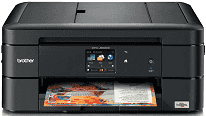
Brother MFC-J680DW printer model is suitable for both personal and commercial uses, considering its specifications. The Brother printer model uses the inkjet printer type of technology and does so with much finesse. At the peak of these specifications are also the details of the high-quality performance and speed. The print head, for instance, for monochrome printing, is one piezo with 210 nozzles. However, for color printing, the print head uses three such piezos with 210 nozzles.
Brother MFC-J680DW Drivers for Windows
d61c3e7a26ae8b72d3e8358a508ddae2c64ad7d250f28dc878b5c887b7a652303bb9c77c7ecc71520ab4a0c995743b58be81d5f58702a1e275b6be6f0b52e4dfBrother MFC-J680DW Drivers for macOS
ab64878616f2d0ddbf65ea85e386b8e122bd5549079ad82012a8d47a21079c992b229ea56fe0606c51a04cf94f9d615a96308c25f6e7574d3490237b47e68261997b441c2d6b6eea9085ab9daf81fa3ce27916856cacc439dab086d1f98550fb6a9ef2865964ff4918dd1441876a80485fb8c329df36aa8d6680deff2eecd53e634537b4d92f3200c35d08d7ded402c28490e7749f86695e61c26b3cc91126b71db35bf9cb989eadcae7a1395cc67a74e7513546c6636c220be141832f2d66dc21b4c7490f1f5e8124a2f6298286e7488571da3235a47d6ec1774d3867cd1591e9da1373a1f4d6b9a7d4354bd249f70dd4440c982b273cec95a109af1ea3dcb2fc20e0731ebde8510267f5d84f20ee2d388b28856270584aa98c9b55650a6968b1626d412ec00f75a1abe18dcda6c62dc704c919b324c25c05645a357c6e4163c59503f190f34b0db53cd32365f7fa031bb4104bfafe041a12e9c98c11b0fd825a7267150b83ee885c1eaea15b7033b2cce24fd9c0ff9335ad5e5e43d2a9371259553d65e3e1fd0efacf7816fbbefce981bc6f2b27ffc20c6b452dba4c4a8d7ca47f2e6b9b5d9f4dc7bf154292f2e691176be4724779a06d00497673134f1a501548b423907bd18324c76cd84d4685f41dc8e610718f8bbc00eeef53a0db2091Brother MFC-J680DW Drivers for Linux
e7b7529e7c0ec0f22f2a66957176af2889cc03bd172094b58145767c1a1b2b784cb99a32f9bfaaa71c6450268a77f546d20503c4b51bc879974ecbcf26720f275ed15a889c044ae4fc1894a332c6f2fba404945ccdd06d2d695a596fe6c255fda860d1ffe66ba17aaa83c8d159112ef539682ade10a5f0cce1161029ec504523027b73648722ac8c8eb1a9c419d284a6562cc763feac9740a2b75a683b0929727d7dcbe8349ae4d4ab816e4551017f2f1fd9fd6bf3f4f3c570fbd9576248dd9f4225e91dd7f7d0ba2a202f616b15b669be7800c271a7d25efed94191f71fc4508bd395b8a25a385eb4a5e2770d4b10b17735203006b7a90a6879a0ef69e5fe4df71dadda535bb90dbfaf88fd603897f96e8b09a2f3ae9bd4e2daafb925e896e24082d824222ec7a7646309260fd661387ca1aa5dc1ffe851db7bbefe5271b755Brother MFC-J680DW Specifications
The memory capacity of the Brother MFC-J680DW device is about 128 MB of RAM, which is an essential factor in getting the best quality out of the printer. The display component is a liquid crystal display (LCD) touchscreen that allows flexibility and fosters ease of use. The size of the LCD color screen is also about 2.7 inches diagonally. The power source of the printer is a range between 220 and 240 volts of an AC circuit at 50/60 Hz.
Furthermore, on the power specifications, the printing and copying processes use approximately 19 watts. Also, the active mode requires 3.5 watts, and the sleep uses 1.3 watts while power off takes 0.2 watts. The depth of the printer is about 172 mm, the height is about 227 mm, and the width is 341 with closed trays. However, when the bins are open, the width becomes 583 mm, and the weight is about 8.3 kg.
The noise level in terms of the sound power involves copying which produces 6.00 B(A) for color printing. Moreover, for monochrome printing, the sound power is about 6.04 B(A) at an average. At the active mode of the printer, both the monochrome and color printing require 2.97 B(A). The recommended temperature limits are between 10 and 35°C for operations. However, on the other hand, for the best print quality, the limits are between 20 and 33°C.
Technical Details
| Title | Brother MFC-J680DW Drivers |
|---|---|
| Device Type | All-in-one printer |
| Driver Version | Varies by driver and operating system |
| Available Downloads | Drivers |
| License | Free |
| Manufacturer | Brother Industries, Ltd. |