
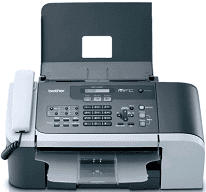
The most outstanding quality of this printer is its portability, yet it does not in any way compromise its quality. In fact, despite its size, it can still perform its multifunctional duties such as scanning, faxing, copying and printing at the best quality and impressive speed. The scanning method uses CIS scanning technology.
Brother MFC-3360C Drivers for Windows
f04f424af19f80a4e7bbd574a2f0f6ffa6831e9983c9762c71a0742efe03e3a39d31a7bd2f230d4651f7da53bb5a5191e94ab6f0b738e959c64b5768c7fb7bef58e0c55a6930d1b74e162d45c515d8676427d9a7263aa98f7e73153b2e7575ade8976f8f31db0f1bd23cb42bef899ae181f3a17d39a2882e1fe5a0c7bf194de1a044569edf6d3c1f1f72dd2bf7c2d1470b063d338d18b8dd497170f962c1e23059039bc112bf6a232e3638dbc5f858d321372fbddd71b18efbb854a829ee9fbf04dd5b50a54e8389e52a663c02fd64cfd3f222ee29a3b0504991781fc4fe53a6Brother MFC-3360C Drivers for macOS
e928ab1b3a4b7993fd2367a46d880dda6a3a30654191c4d241786cac76819ed747e26a481968bd3ae74b6d77b69c018982a7e0451375ed6990cb18cfd6c92b59104ecfe5f1c2d3b8ca19b07f0dc34fd21ae735598d258a0d8d2a1c818b6c3766e58fb54ebe7bae5cf49dc5e98187894a9b6e0972e70abfdd8f5d965d3d1ae4b6c5aee806824efd5b009724b77c7a50ea97d2e30987c37c3744028b862d0218ec868ee1de715a54d657a791d0077a3621bbc02efe2d1d5e69a9b3472a42f1aad00ca5d805c1f9c797775b508fedee453d77ae164eff0cb55b372e1768b12aa27cf8b36b787a34698bbe669254a86c305f6b4a595b292f97c41e6e82816be371ddBrother MFC-3360C Drivers for Linux
f29c5cb458dda22068c8fce424fc041d993af1452123ea0bb158a0d626115588e3bb4815a5f4d637c934b0ecf0e793f0dae4f567dc2aaaf25f9398a101e18cf6432fb273c1f6b3f14f487fd59b411c5e09c6be3e3df376e5dfda1417221b02c0c63670f6126161d188b0efbbed99d1c584bfb0f77ab718c7a99e88a8c925a77eab02c4e2292e9847a0338a225973735ccaec49c3d443f584004c8f91f5d6a8c92c62a817626e1caa728b1279e4768d66546850f57d4bb5a73c825cb897bd114af9c12f8467288c48cd00b532b2c64f53764a001f4b193f1c5f1ac746a1bd7c9cf71dadda535bb90dbfaf88fd603897f96e8b09a2f3ae9bd4e2daafb925e896e24082d824222ec7a7646309260fd661387ca1aa5dc1ffe851db7bbefe5271b755Brother MFC-3360C Specifications
The physical dimensions of the printer include a weight of 13.2 lbs, a height of 8.4 inches, a width of 16.0 inches and a depth of 11.5 inches. The printer supports the use of an automatic document feeder (ADF) which supplies more paper into the input component of the printer. This ADF can hold up to 20 sheets of plain paper for this printer.
On the other hand, the Brother MFC-3360C printer input tray can only hold up to 100 sheets of plain paper while the output tray holds up to 50 sheets of printed paper. The connectivity interface of the device is through the USB 2.0 port while there is no other alternative for connection. The internal memory of the printer is up to 16 MB of RAM, and it also supports an external TAD interface too.
Faxing is at a transmission speed of approximately 3 seconds while the modem speed is 33600 bps. The coding method works with the monochrome formats such as MH, MR, MMR and the color format JPEG. The color depth is at 256 levels for color printing, and it also supports a dual access feature as well as delayed faxing of up to 50.
There is also a broadcasting feature with this printer that can send to up to 160 different locations at maximum as well as a page memory of up to 200 pages. The printer is capable of error correction mode (ECM), remote access, fax forwarding, and paging features.
Technical Details
| Title | Brother MFC-3360C Drivers |
|---|---|
| Device Type | All-in-one printer |
| Driver Version | Varies by driver and operating system |
| Available Downloads | Drivers |
| License | Free |
| Manufacturer | Brother Industries, Ltd. |