
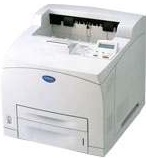
This model of the Brother printer is an exceptional one with unique properties for choice. The print technology is the electrophotographic print method with an average speed of up to 34 pages per minute (ppm). This speed applies to print on an A4, but the printing on a letter-sized paper takes a speed of 35 ppm. The speed for the production of the first page is less than 9 seconds. The print resolution depends on the applicable operating systems, whether Windows, Linux, and Macintosh.
Brother HL-8050N Driver for Windows
Driver and Software for Mac OS
Specifications
In details, the compatible Windows OS versions which include 95, 98, Me, NT4.0, 2000 and XP runs at 300dpi (minimum). Beyond this resolution, the following status is 600 dots per inch (dpi) while the maximum resolution is 1200 x 1200dpi. The inbuilt processor is the Toshiba TMPR4955 type which runs at a speed of 300 MHz. the standard internal memory is up to 64 MB of RAM and is co-responsible for the best print quality. The memory of this is expandable up to 576 MB through the 2 DIMM slot of gradual grades and sizes.
The printer connects through its standard USB 1.1 port and the IEEE 1284 parallel component. The other alternative is through the 10/100 Base-TX Ethernet port, and the last option is the 802.11b solutions. The network connectivity of this device includes that of the Ethernet with auto-negotiation with TCP/IP and IPX/SPX protocols. Other compatible protocols include AppleTalk, DLC/LLC, and NetBEUI. The management tools include Web BRAdmin, BRAdmin professional, and the web-based management component.
The display components of this printer are of two types, the LCD with two lines compatibility and two LEDs. The control buttons include nine keys to include Go, cancel, reprint, set, back, secure print, and two scroll keys. Furthermore, this printer has a standard tray that can hold up to 150 sheets and another input tray of 550sheets. Download Brother HL-8050N driver from Brother Website