
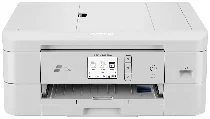
Brother DCP-J1800DW Driver helps the computer communicate correctly with this wireless all-in-one inkjet printer. Once the software is installed, the computer can send print jobs and receive scan data from the same device. Copying is handled from the printer itself, using the scanner to read the original document. A nearby computer can connect through USB, and wireless setup lets the printer work over a Wi-Fi connection.
Brother DCP-J1800DW Drivers for Windows
7b7edd6c73a043670d92de9f0863bb97466a339a53b7b202fbb22c1f39ffff3ed05075e74de23e44500efa7817877a34435409e9281d749ab8daedbfb4388209d05075e74de23e44500efa7817877a34435409e9281d749ab8daedbfb43882090edce9170c3f46f065e52aa6335c093befa453212698a94c7d59fcfc5197fa7e0917273bb5bc10ee4775f36bd98bd05152835bf5370614cf5a803ffa9260b0adBrother DCP-J1800DW Drivers for macOS
423bb79080c8f94590acf4b79dfed2f49c33a7401f9156f10823f6cac004b0aeBrother DCP-J1800DW Drivers for Linux
387264d90c5a12a86aeddabea683fe8fb094705914360c6d041016a9e5f56456e2b2885f6a64514ad13c90877e32f657dd536073e82bfed5218127184829b7019c3a200db3dc7b2b3332dff8c5226b4f3ee560d20b2e1f4918b1faf7124517b2197f63a52e89b8744f5a3c2d843abb3b76d003d5d4830bdfe675c44841a6c72bcda25534ea8e3018e7d46b970cb08b36084355adedc933aba0c8c7d03e903db901dc859f1978e645147ced5ec4b5448cc3e26b1c6d2f1104834f5891c0e17469d724746540a51f8286f2a318b47657227f7131d384a1a4f0475dacb7e3580f3ee74ef3a5529ebf3b26d6139ce15d75374a4538ba2efd48c28b209b0d705e5ec72ba3bffcf199fee6387cb79d6923214648db0f2df1c5a13f8f8f0a6fe0995c401404f2622e60470b4de25d0cdb4adc0f130ace6b380cc0d4b3d7714ad761c1ae82aa17ba2e331de1fcb34f0a839d27b9b193ac680d9742250a89e588a6bd56206c4e17c6dbcf263d9d08fb460ccd5b9f1a23fce79b30d0a41d96a224839322b2Brother DCP-J1800DW Specifications
The Brother DCP-J1800DW is a colour inkjet multifunction printer with printing, scanning, and copying. Its print engine uses piezo heads, carrying 210 mono nozzles and 210 nozzles for each colour channel. Memory reaches 512 MB, while walk-up control uses a 2.7-inch, 67.5 mm TFT colour touchscreen. An automatic document feeder holds up to 20 pages of 80 g/m² paper for scanning originals.
Print resolution reaches up to 1200 x 6000 dpi, and ISO speed runs at 17.0 ipm mono and 16.5 ipm colour. Automatic two-sided printing works on A4, Letter, Executive, and A5 plain or recycled paper. Brother lists cut printing for A4. Borderless output covers A4, Letter, A6, 10 x 15 cm, 9 x 13 cm, 13 x 18 cm, and 13 x 20 cm sizes.
Scanning works through the flatbed and ADF. Resolution reaches 1200 x 2400 dpi from the glass and 1200 x 600 dpi from the feeder. The scanner glass accepts documents up to 215.9 x 297 mm, while the ADF takes originals 148 to 215.9 mm wide by 148 to 355.6 mm long. Copying prints up to 1200 x 2400 dpi, with 25% to 400% resizing and up to 99 copies.
Paper input comes from a 150-sheet main tray and a one-sheet manual feed slot. The tray accepts plain, inkjet, glossy, and recycled paper, including A4, Letter, Executive, A5, A6, envelopes, photo paper, Photo 2L, and index cards. Printed pages collect in a 50-sheet output area when using 80 g/m² plain paper. Connections cover Hi-Speed USB 2.0, Ethernet, wireless LAN, and Wi-Fi Direct, while the unit weighs 8.3 kg.
Technical Details
| Title | Brother DCP-J1800DW Drivers |
|---|---|
| Device Type | All-in-one printer |
| Driver Version | Varies by driver and operating system |
| Available Downloads | Drivers |
| License | Free |
| Manufacturer | Brother Industries, Ltd. |