
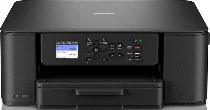
Brother DCP-J1310DW Driver helps the computer communicate correctly with this wireless all-in-one printer. After installation, the computer can send print jobs to the device and use the built-in flatbed for scanning. Copying is handled from the printer itself, using the same print engine and scanner hardware. A nearby computer can connect through USB, while wireless setup lets the printer receive jobs over the network. Once the connection is active, document output and scan requests can reach the correct function without being routed to the wrong device.
Brother DCP-J1310DW Drivers for Windows
d04342f45663760da21c00cb9ea2048ac66a75372a77d0e3da85b844ed41acbe13e17877a6865860a35fc7a59dd4340ce6c384e1f0eefd83f29fac5532d36ab613e17877a6865860a35fc7a59dd4340ce6c384e1f0eefd83f29fac5532d36ab60edce9170c3f46f065e52aa6335c093befa453212698a94c7d59fcfc5197fa7e0917273bb5bc10ee4775f36bd98bd05152835bf5370614cf5a803ffa9260b0adBrother DCP-J1310DW Drivers for macOS
5ffed451c48b8b7f133362beb835071fe5563742c00dcf1763b73791b2b84a0dBrother DCP-J1310DW Drivers for Linux
885e50ddce66edf22481d23abd8f653bc9298b0c4e5122e32713d482b52204ee61521cb88e2e6b46e8ef585ac95bdb906b9cfdc03d6120d53f9250307a869d1b9c3a200db3dc7b2b3332dff8c5226b4f3ee560d20b2e1f4918b1faf7124517b2197f63a52e89b8744f5a3c2d843abb3b76d003d5d4830bdfe675c44841a6c72bcda25534ea8e3018e7d46b970cb08b36084355adedc933aba0c8c7d03e903db901dc859f1978e645147ced5ec4b5448cc3e26b1c6d2f1104834f5891c0e17469d724746540a51f8286f2a318b47657227f7131d384a1a4f0475dacb7e3580f3ee74ef3a5529ebf3b26d6139ce15d75374a4538ba2efd48c28b209b0d705e5ec72ba3bffcf199fee6387cb79d6923214648db0f2df1c5a13f8f8f0a6fe0995c401404f2622e60470b4de25d0cdb4adc0f130ace6b380cc0d4b3d7714ad761c1ae82aa17ba2e331de1fcb34f0a839d27b9b193ac680d9742250a89e588a6bd56206c4e17c6dbcf263d9d08fb460ccd5b9f1a23fce79b30d0a41d96a224839322b2Brother DCP-J1310DW Specifications
The Brother DCP-J1310DW is a colour inkjet multifunction printer with print, scan, and copy functions. Brother does not list fax for this DCP model. A piezo inkjet head drives printing, with 210 black nozzles and 70 nozzles for each colour channel. LC521 black, cyan, magenta, and yellow cartridges supply the ink. Onboard memory is 256 MB, while a 4.5 cm colour LCD sits beside front-panel key controls.
Print resolution reaches up to 1200 x 6000 dpi. ISO A4 speed runs at 16 ipm in mono and 9 ipm in colour. First output takes 6.2 seconds in mono or 9.6 seconds in colour. Automatic duplexing works with plain or recycled paper at A4, Letter, Executive, and A5 sizes. Scanning relies on a CIS flatbed with 1200 x 2400 dpi optical resolution and up to 19200 x 19200 dpi interpolation.
Paper input comes from one standard tray holding up to 150 sheets of 80 gsm plain paper. The tray accepts A4, Letter, Legal, Folio, Executive, A5, and A6. Envelopes, photo paper, and index-card sizes fit the same feed. Printed output holds up to 50 sheets. Media support covers plain, inkjet, glossy, and recycled paper from 64 to 220 gsm. Originals go on the scanner glass, not through an automatic document feeder.
A nearby computer connects through Hi-Speed USB 2.0. Wireless networking covers 2.4 GHz 802.11b/g/n and 5 GHz 802.11a/n infrastructure modes. Wi-Fi Direct runs through IEEE 802.11g/n. Mobile printing works with Brother Mobile Connect, AirPrint, Mopria, and the Brother Print Service Plugin. Without carton materials, physical measurements are 390 mm wide, 343 mm deep, and 148.5 mm high. Body weight is 6.3 kg, and copying power is near 21 W.
Technical Details
| Title | Brother DCP-J1310DW Drivers |
|---|---|
| Device Type | All-in-one printer |
| Driver Version | Varies by driver and operating system |
| Available Downloads | Drivers |
| License | Free |
| Manufacturer | Brother Industries, Ltd. |