
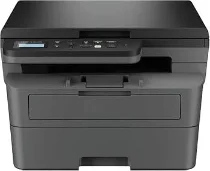
Brother DCP-B7600DB Driver helps the computer communicate correctly with this mono multifunction laser printer. Once the software is installed, the computer can send print jobs and receive scan data from the same machine. Copying is handled from the printer control panel, using the scanner to read the original document. A direct computer setup uses the USB connection, so print commands and scan requests can move to the correct function.
Brother DCP-B7600DB Drivers for Windows
39e79ad01e90ead3305c24ca8c9d5d11708589c94b880182f74b00412fc5c3ba2ef107682e8520429612da8e37519ed2e47dfedc53e71e7561f6e59e05d55a1a2ef107682e8520429612da8e37519ed2e47dfedc53e71e7561f6e59e05d55a1ac1e3816b3f9786ddc566d761bd48e165e6e58d7d5c8c41b362139fcc98289a136eddedfff4131bc903d581f6dc86a8518e1c82980a4cd38b4396c4c1bb1338d3ee2cabe92d46f7f6804a469fbdf46bfefbc58df649a126f936d83c3cc990a4efba40f5efe1d1d3896139bc31bc28b4a3f2e75c76684987239019db6a68d6977d5f3ad9dd0475f7524f0e489aa7076da168c228bcd22031394a53fad4b9a2573f0917273bb5bc10ee4775f36bd98bd05152835bf5370614cf5a803ffa9260b0adBrother DCP-B7600DB Drivers for Linux
b46eabeb5d6d57fa18ebf16b31c6a696e8800922cdb613bd397cce0efed7a4068237147787511ca7a46c5b844c5ba5fdf63db1f1cc0aeaee566bcfef038667869c3a200db3dc7b2b3332dff8c5226b4f3ee560d20b2e1f4918b1faf7124517b2197f63a52e89b8744f5a3c2d843abb3b76d003d5d4830bdfe675c44841a6c72bcda25534ea8e3018e7d46b970cb08b36084355adedc933aba0c8c7d03e903db901dc859f1978e645147ced5ec4b5448cc3e26b1c6d2f1104834f5891c0e17469d724746540a51f8286f2a318b47657227f7131d384a1a4f0475dacb7e3580f3ee74ef3a5529ebf3b26d6139ce15d75374a4538ba2efd48c28b209b0d705e5ec72ba3bffcf199fee6387cb79d6923214648db0f2df1c5a13f8f8f0a6fe0995c401404f2622e60470b4de25d0cdb4adc0f130ace6b380cc0d4b3d7714ad761c1ae82aa17ba2e331de1fcb34f0a839d27b9b193ac680d9742250a89e588a6bd56206c4e17c6dbcf263d9d08fb460ccd5b9f1a23fce79b30d0a41d96a224839322b2Brother DCP-B7600DB Specifications
The Brother DCP-B7600DB is a monochrome laser multifunction printer with printing, scanning, and copying. Its electrophotographic laser engine works with 256 MB memory and a 600 MHz processor. Local control uses a two-line LCD with 16 characters per line, paired with button operation rather than a touchscreen. The machine uses TNB021 black toner and a DRB021 drum, while this DCP model has no fax function.
Print resolution reaches up to 1200 x 1200 dpi, while A4 speed runs at up to 34 ppm and Letter speed reaches 36 ppm. From ready mode, first print out time is less than 8.5 seconds. Automatic duplex printing works for A4 and Letter on plain, thin, or recycled paper. Copying runs at up to 34 cpm, with 600 x 600 dpi resolution and 25% to 400% resizing.
Scanning relies on a CIS flatbed with up to 1200 x 1200 dpi optical resolution for document capture. On Windows, interpolated resolution reaches up to 19200 x 19200 dpi. The scanner glass accepts documents up to 215.9 x 300 mm. Without an automatic document feeder, multi-page originals need manual placement on the glass. Scan-to options include file, image, OCR, email, and SharePoint on Windows.
Paper input comes through a 250-sheet tray and a one-sheet manual feed slot. Accepted media include plain, thin, thick, recycled, bond, label, and envelope paper, while sizes include A4, Letter, B5, A5, A6, Executive, Legal, India Legal, Folio, 16K, and common envelopes. Output capacity reaches 120 face-down sheets. Hi-Speed USB 2.0 provides the only connection. Physical measurements are 410 x 399 x 272 mm, and the listed weight is 10.5 kg.
Technical Details
| Title | Brother DCP-B7600DB Drivers |
|---|---|
| Device Type | All-in-one printer |
| Driver Version | Varies by driver and operating system |
| Available Downloads | Drivers |
| License | Free |
| Manufacturer | Brother Industries, Ltd. |