
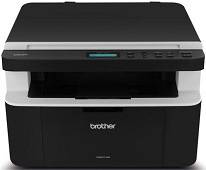
The Brother DCP-1512 printer model belongs to the same printer series as DCP-1510, MFC-1810 and MFC-1815 models. This particular model works with the electrophotographic laser print technology that helps the user to optimize the printing resources. The power source for the optimum performance of the printer is within 110 and 120 volts and 50/60 Hz for Mexico and between 220 and 240 volts for Chile and Argentina.
Brother DCP-1512 Drivers for Windows
f7e61976c04b7aa70a77a5460bb600f65875967fc2c49d8d8446eb1851245444Brother DCP-1512 Drivers for macOS
ccd05a0ff77b516148780b0faac3e495cc38a6893f850a417f0d8275770fb253f3a27f3126f7b3b5a04e0481ad743564f6fd1d6e039ec33ec3c687af15a1aa0aab64878616f2d0ddbf65ea85e386b8e122bd5549079ad82012a8d47a21079c992b229ea56fe0606c51a04cf94f9d615a96308c25f6e7574d3490237b47e68261a438aa1f33362f2a479458c2f2b65b4c63587d7bc1a7c39543a860e830aa0ea96a9ef2865964ff4918dd1441876a80485fb8c329df36aa8d6680deff2eecd53ea314aeb45f7ba51cb8989699479904e66af2b3bdfe9c46e581fa2cf5cde18df0949467d5fd874da4f4bcf9028483495f8319aad70483dbb26c2c4db964fbc8a7ca245471c017a7bd2f5ff15a26183b1693353ded71e7110bc9347bd97509cc0e5a7267150b83ee885c1eaea15b7033b2cce24fd9c0ff9335ad5e5e43d2a9371259553d65e3e1fd0efacf7816fbbefce981bc6f2b27ffc20c6b452dba4c4a8d7c65a76003b7261eaef78f07a2046120065ececf80908847fd66687223d4c5b25fa47f2e6b9b5d9f4dc7bf154292f2e691176be4724779a06d00497673134f1a501c314e965ea405afba0a391130d9e5dfcadfc1f48d1bc507e1e02e63f0e2be6247e26a481968bd3ae74b6d77b69c018982a7e0451375ed6990cb18cfd6c92b59623af72665493bb62cd501e079c0f011be6d0066b02d05bcaa36415bd4d5aa7f7e20f7f00511b347d9a8e9d2cbe9c6dae9828bad751d1aa5f9f263c7db238bb3d7f11bf9474391c34daec302cce375229941842f2f4c0f7ce284fba64eb6c315868ee1de715a54d657a791d0077a3621bbc02efe2d1d5e69a9b3472a42f1aad0Brother DCP-1512 Drivers for Linux
79d10a901f552652c8ad0eff60a7d2a3e03911f9a710471df06c69a46776bcaa5604fc8c880fc23f47529e41efafdd4679dead8a859aaea0c43d6866bc7150e7f4af8f3455a7d6860b54b1a175d4440ac4b2c8d7641f2fdd9410c4a3a1ce8c799ec2f10326839ec70e097c53ed3854acc6179264212f64da29e989b6c416629a027b73648722ac8c8eb1a9c419d284a6562cc763feac9740a2b75a683b0929727d7dcbe8349ae4d4ab816e4551017f2f1fd9fd6bf3f4f3c570fbd9576248dd9f4225e91dd7f7d0ba2a202f616b15b669be7800c271a7d25efed94191f71fc4508bd395b8a25a385eb4a5e2770d4b10b17735203006b7a90a6879a0ef69e5fe4dBrother DCP-1512 Specifications
The power consumption of the printer, on the average, is a function of the particular activity of the device such as printing, copying, scanning or any other process. For instance, printing and copying require a power of up to 380 watts at 25°C while the active mode uses approximately 40 watts at the same temperature. When the printer is in a deep sleep, it consumes about 1.3 watts of power, but at power off, the power consumption is about 0.28 watts.
Physically, this Brother DCP-1512 printer weighs about 17.6 lbs, which is about 8.0 kg, aside from the height of 11.1 inches, a depth of 13.3 inches and a width of 18 inches. The operating temperature of the device to produce optimum performance ranges between 10 and 32.5°C while it should remain between 0 and 40°C during storage. Concerning humidity, operations are between 20 and 80% while that of the room should stay between 10 and 90% without condensation.
The main channel of connectivity to this device is the hi-speed USB 2.0 port which requires the use of an appropriate USB cable of type A/B not longer than 6 feet. Scanning through the scanner glass works on one sheet at a time, and the component also allows a length that is up to 300 mm and a width up to 215.9 mm. The scanner glass itself also weighs about 4.4 lbs, which is equivalent to 2.0 kg.
Technical Details
| Title | Brother DCP-1512 Drivers |
|---|---|
| Device Type | All-in-one printer |
| Driver Version | Varies by driver and operating system |
| Available Downloads | Drivers |
| License | Free |
| Manufacturer | Brother Industries, Ltd. |