
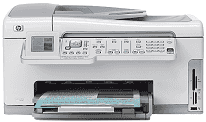
HP Photosmart C6150 is an all-in-one printer with the ability for a quick, easy and top-quality tasks. These include scanning, copying, sending and receiving fax messages, and printing from a memory card. Many of these functions are accessible from the control panel, even without turning on the computer. The print photos function has a memory card slot and a front USB port that enables users to print or edit photos. The device publishes a software application for a range of projects such as borderless images and newsletters, etc.
HP Photosmart C6150 Driver for Windows
Driver and Software for Mac OS
HP Photosmart C6150 cartridges
HP02 Black Ink Cartridge (~660 pages ), HP 02 Cyan Ink Cartridge (~400 pages ), HP 02 Magenta Ink Cartridge (~370 pages ), HP 02 Yellow Ink Cartridge (~500 pages ), HP 02 Light Magenta Ink Cartridge (~230 pages ), HP 02 Light Cyan Ink Cartridge (~220 pages )
Printer Specifications
1. The HP Photosmart C6150 printer supports various media types such as plain paper, photo paper, labels, envelopes, transparent films, etc. The input paper tray holds a maximum of 100 sheets of plain paper while the output tray holds 50 sheets. Kindly note that the output tray capacity depends on the amount of ink and the type of paper in use. Therefore, HP recommends a regular emptying of the output tray.
2. Printing with this device produces at a resolution of 1200 x 1200 rendered dpi for black prints from a computer. Printing is color is at a resolution of 4800 x 1200 optimized dpi color with an input of 1200 dpi.
3. The printing method of this device is drop-on-demand thermal inkjet technology with a print language of PCL3 GUI.
4. The duty cycle of this machine is 3000 printed pages per month.
5. During a copying process, the resolution is 4800 x 4800 at maximum with digital image processing.
6. It produces up to 99 copies from an original document, although it still depends on the particular model in use.
7. Copying range has a maximum of 400% with a fit to page function. Note that this feature also depends on the model of the printer in use.
Download HP Photosmart C6150 All-in-One Printer driver from HP website