
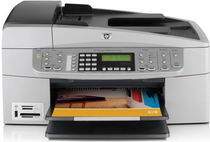
The all in one range of printers by HP can suit all your office requirements. They excel in printing, scanning, copying, fax and many more featured functions making them essential for office and home alike. The HP Officejet 6310v is one of them which have a range of services. Its larger scanning area allows the users to scan large size documents with an optical resolution of 2400×4800 dots per inch. The interface of the scanner is compliant with TWAIN.
HP Officejet 6310v Driver for Windows
Driver and Software for Mac OS
Specifications of the HP Printer Officejet 6310v:
Print: in color printing, the resolution optimized to 4800 dots per inch, and for black documents, it is 1200×1200 dots per inch.
Copy: the copying resolution for best quality is 600×1200 for black and colored documents. It has a zooming capacity of up to 400%.
Fax: the printer is programmed to give confirmation reports of the fax. It can switch automatically between answering the phone and faxing any documents.
Paper: the paper types include plain paper, legal paper, cards, labels, transparent films, photo paper. All of these have variable paper tray capacity and printing speed.
HP Officejet 6310v Printer cartridges
HP98 Black Original Ink Cartridge (~420 pages ), HP 93 Tri-color Original Ink Cartridge (~220 pages ), HP 95 Tri-color Inkjet Print Cartridge (~330 pages ), HP 99 Photo Original Ink Cartridge (~130 pages ), HP 100 Gray Photo Original Ink Cartridge (~80 pages )
Compatible operating systems of HP Officejet 6310v driver:
Operating system: Windows Operating System: Windows 2000, XP, Vista and 7
Macintosh: OS X version 10.3 and 10.4
Processor: Intel Pentium, Celeron or higher for Windows 2000 and XP
Any 800 GHz or higher processor for Windows Vista and 7
G3 or higher processor for OS X version 10.3 and 10.4
RAM: 128 MB or higher for Windows 2000 and XP and OS X version 10.3 and 10.4
512 MB or higher for Windows Vista and 7
Latest operating system HP Officejet 6310v driver:
In Windows operating system the Windows versions of 8, 8.1, and 10 are fully compatible, and in Macintosh, the OS X version 10.13 is also compatible.
Features of this printer:
1. Compact size
2. Has an automatic document feeder
3. It can support various types of memory cards.