
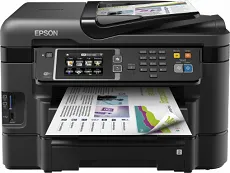
One of the Epson WorkForce WF-3640DTWF printer model specifications is the PrecisionCore print head printing technology. This system of print requires up to 800 nozzles for black and 256 nozzles for color printing. Simultaneously, the minimum ink droplet size is about 2.8 picolitres (pl) with variable-sized droplet technology. Also, ink technology is the DURABrite ultra model, making the machine most suitable for home and office uses.
Epson WorkForce WF-3640DTWF Driver for Windows
Driver and Software for Mac OS
Specifications
It can print, copy, scan, send, and receive fax messages as a multifunction printer. As a printer, the print rate under the ISO/IEC 24734 mode is up to 19 pages per minute (ppm) for black and white documents. On the other hand, color documents have a print rate of 10 ppm under the same printer model’s ideal conditions. Printing with the Epson WorkForce WF-3640DTWF machine also supports duplex printing mode, which has a very different print speed but for the same standard paper size.
Duplex printing for black and white documents is up to 9.2 pages per minute, but color papers run at 6.3 pages per minute. On the other hand, printing with the machine at the normal mode has 33 pages per minute for 75 gsm plain paper. However, printing on the same paper type in color has a speed of 20 ppm. Also, the maximum printing resolution from this machine is up to 4800 x 1200 dpi. At the same time, it can produce a print volume of up to 20,000 pages per month.
Its optical resolution is not more than 1200 x 2400 dots per inch (dpi) while scanning. The output formats can only be BMP, searchable PDF, JPEG, TIFF, and PDF. Its scanner type is the contact image sensor (CIS) element. The machine also uses a walk-up monochrome and color faxing component. At the same time, it transmits at the rate of 33.6 kbps, which is approximately 3 seconds per page. Download Epson WorkForce WF-3640DTWF driver from Epson website