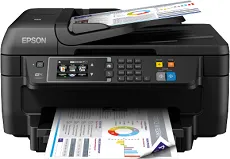
The Epson WorkForce WF-2760DWF printer model is a fantastic machine with the latest PrecisionCore Print head through the best print technology. This machine can use 400 nozzles for black printing and 128 nozzles for color printing technology concerning the nozzle configuration. Its minimum droplet size is about 3.3 picolitres (pl) with a variable-sized droplet technology. Its ink technology is the DURABrite ultra mode, making the machine home or office-based desktop machine.
Epson WorkForce WF-2760DWF Driver for Windows
Supported OS: Windows 11 (64-bit), Windows 10 (32-bit), Windows 10 (64-bit), Windows 8.1 (32-bit), Windows 8.1 (64-bit), Windows 8 (32-bit), Windows 8 (64-bit), Windows 7 (32-bit), Windows 7 (64-bit), Windows Vista (32-bit), Windows Vista (64-bit), Windows XP (32-bit), Windows XP (64-bit)
Drivers and Utilities Combo Package Installer for Windows 32-bit and 64-bit(Recommended)
Supported OS:Windows 11, 10, 8, 8.1, 7, Vista 32-bit and 64-bit
13.05 MB
Printer Driver for Windows 32-bit(Recommended)
Supported OS:Windows 10, 8, 8.1, 7, XP, Vista 32-bit
28.80 MB
Printer Driver for Windows 64-bit(Recommended)
Supported OS:Windows 11, 10, 8, 8.1, 7, XP, Vista 64-bit
32.87 MB
Scanner Driver and EPSON Scan Utility for Windows 32-bit and 64-bit(Recommended)
Supported OS:Windows 32-bit and 64-bit
35.78 MB
Scanner Driver for Windows 32-bit and 64-bit(Recommended)
Supported OS:Windows 10, 8, 7, Vista, XP 32-bit and 64-bit
35.84 MB
Remote Print Driver for Windows 32-bit
Supported OS:Windows 10, 8, 8.1, 7, vista, xp 32-bit
8.42 MB
Remote Print Driver for Windows 64-bit
Supported OS:Windows 11, 10, 8, 8.1, 7, vista, xp 64-bit
9.09 MB
Universal Print Driver for Windows 32-bit and 64-bit(Recommended)
Supported OS:Windows 10, 8, 7 32-bit and 64-bit
53.53 MB
Scan Updater for Windows 32-bit and 64-bit(Recommended)
Supported OS:Windows 10 32-bit and 64-bit
733.95 kB
Driver and Software for Mac OS
Supported OS: macOS Monterey 12, macOS Big Sur 11, macOS Catalina 10.15, macOS Mojave 10.14, macOS High Sierra 10.13, macOS Sierra 10.12, OS X El Capitan 10.11, OS X Yosemite 10.10, OS X Mavericks 10.9, OS X Mountain Lion 10.8, OS X Lion 10.7, Mac OS X Snow Leopard 10.6, Mac OS X Leopard 10.5
Drivers and Utilities Combo Package Installer for macOS
Supported OS:macOS 10.15 to 12
6.80 MB
Printer Driver for macOS
Supported OS:macOS 10.6 to 12
78.46 MB
ICA Scanner Driver for Image Capture utility for macOS
Supported OS:macOS 10.5 to 12
23.55 MB
Remote Print Driver for macOS
Supported OS:macOS 10.6 to 12
27.51 MB
Scanner Driver and Epson Scan 2 Utility for macOS
Supported OS:macOS 10.15 to 12
25.20 MB
Drivers and Utilities Combo Package Installer for macOS
Supported OS:macOS 10.7 to 10.14
14.95 MB
Scanner Driver and EPSON Scan Utility for macOS
Supported OS:macOS 10.6 to 10.14
30.03 MB
Scan 2 Driver for macOS
Supported OS:macOS 10.5 to 10.15
26.76 MB
Remote Print Driver for macOS
Supported OS:macOS 10.5
24.14 MB
Scanner Driver for macOS
Supported OS:macOS 10.5 to 10.12
29.47 MB
ICA Driver for macOS
Supported OS:macOS 10.5 to 10.15
15.41 MB
Uninstall Center for macOS
Supported OS:macOS 10.15, 11
1.17 MB
Scan Common Updater for macOS
Supported OS:macOS 10.5 to 10.12
42.27 MB
Specifications
The Epson WorkForce WF-2760DWF machine can print, copy, scan, and fax documents as a multiple purpose machine. In terms of the printing speed at the ISO/IEC 24734 standard mode, the print rate is up to 13 pages per minute (ppm) for monochrome printing. On the other hand, color printing has a print rate of 7.3 ppm for the simplex or single-sided mode. However, duplex printing at the same standard method has a print rate of 6.5 ppm for monochrome and 4.5 ppm for color printing.
Related Printer : Epson WorkForce WF-2750DWF Driver
Furthermore, printing at the normal mode has a print rate of 33 ppm for black and white documents. On the other hand, color printing has a print rate of 20 ppm when the average paperweight is about 75 gsm. It also has a printing resolution is up to 4800 x 1200 dots per inch (dpi). The printing volume is up to 3000 pages in a month with support for colors such as black, cyan, magenta, and yellow.
Under scanning, single-sided mode runs at the rate of 3 images per minute with the automatic document feeder (ADF) with a scan resolution of 200 dpi. This rate applies to using flatbed scanning, but it takes 12 seconds to scan with the ADF. On the other hand, color scanning has a rate of 27 seconds, with the flatbed scan running through the ADF. Download Epson WorkForce WF-2760DWF driver from Epson Website
