
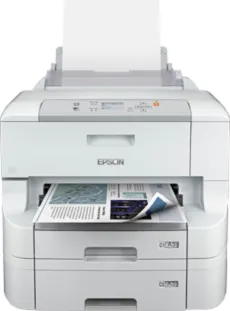
The Epson WorkForce Pro WF-8090 DTW printer model’s first-page-out time is about 7 seconds for monochrome and color documents. Also, at the ISO/IEC 24734 standard print modes, the print rate is about 24 ppm for both color and monochrome documents. This rate applies to simplex printing, but duplex printing mode runs at the speed of 16 ppm for A4 paper size. Simultaneously, when printing on A3 paper size, the print rate is 13 ppm for simplex mode and 11 ppm for duplex mode.
Epson WorkForce Pro WF-8090 DTW Driver for Windows
Driver and Software for Mac OS
Specifications
The Epson WorkForce Pro WF-8090 DTW printer model’s first-page-out time is about 7 seconds for monochrome and color documents. Also, at the ISO/IEC 24734 standard print modes, the print rate is about 24 ppm for both color and monochrome documents. This rate applies to simplex printing, but duplex printing mode runs at the speed of 16 ppm for A4 paper size. Simultaneously, when printing on A3 paper size, the print rate is 13 ppm for simplex mode and 11 ppm for duplex mode.
Related Printer : Epson WorkForce Pro WF-8590DWF Driver
Regular printing with the Epson WorkForce Pro WF-8090 DTW model has a print rate of 34 ppm. The maximum printing resolution is about 4800 x 1200 dots per inch (dpi). Simultaneously, the optimum printing volume is up to 65000 pages in a single month. The color options include black, cyan, magenta, and yellow. Its compatible printing protocols include LPR, IPP, Port 9100, FTP, TCP/IPv4, and LDP.
The connection interface options include the standard USB 2.0 hi-speed port and an Ethernet Interface 1000/100 Base-T/TX. This machine can also work with the wireless LAN IEEE 802.11 b/g/n and Wi-Fi Direct. It also has compatible paper formats such as A4, A5, A6, B5, C4, C6, letter, legal, A3, and photo paper sizes. Its consistent paperweight is also between 64 and 256 gsm and supports duplex printing.
Concerning the paper holding capacity, Epson WorkForce Pro WF-8090 DTW has a main standard input tray that can hold 831 sheets. Besides, its MP tray can accommodate 81 sheets of plain paper. However, the output tray will contain 250 sheets of printed paper under ideal conditions. the power supply voltage for this machine model is between 100 and 240 volts of an AC with 50/60 Hz. Download Epson WorkForce Pro WF-8090 DTW driver from Epson Website