
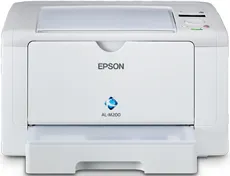
The Epson WorkForce AL-M200DN model’s printing resolution is up to 1200 x 1200 dots per inch (dpi) through the AcuBrite toner system. As an office workgroup machine, it can also print high-quality documents in the best mode. The print rate is up to 30 pages per minute at the monochrome single-sided print mode in terms of speed. However, it takes about 7 seconds to produce the first-ever page.
Epson WorkForce AL-M200DN Driver for Windows
Driver and Software for Mac OS
Specifications
This machine can produce up to 30,000 pages of the highest yield in a month. Concerning the connectivity, its interface works through a standard USB type B, plus a wired network and wireless LAN IEEE 802.11b/g. Its compatible network printing protocols include the Port 9100, WSD, and NDS print server. Simultaneously, the network management protocols include SNMP, HTTP, DHCP, BOOTP, WSD, mDNS, SMTP, and POP3.
Furthermore, the supported paper formats include the A4, A5, B5, C5, Dl envelopes, letter, monarch, legal, and executive. It also supports duplex printing, which is printing on both sides of the paper. The Epson WorkForce AL-M200DN machine also keeps a paperweight within 60 and 163 gsm, while the output paper tray capacity is 125 sheets. Moreover, the device’s standard tray can hold up to 250 sheets of plain paper, but the maximum capacity reaches 260 sheets.
Some of the machine’s general specifications include a supply voltage within 220 and 240 volts of an AC. It also supports a frequency within the range of 50 and 60 Hz. In terms of the physical dimensions, this machine has a width of 385 mm, a depth of 356 mm, and a height of 240 mm. the product weight is not more than 6.8 kg. Simultaneously, the supported temperature is within ten 320C under ideal conditions. Download Epson WorkForce AL-M200DN driver from Epson website