
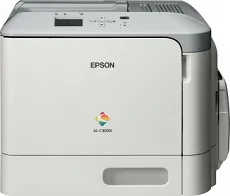
The Epson WorkForce AL-C300N model is a departmental office device that can produce documents with a maximum print resolution of 1200×1200 dots per inch (dpi). Besides, it makes an optimum print speed of 31 pages per minute (ppm) for monochrome and color documents in single-sided mode. Similarly, its first page out time is not more than 12 seconds for both color and monochrome documents. The machine also takes about 38 seconds to warm up and be ready to print.
Epson WorkForce AL-C300N Driver for Windows
Driver and Software for Mac OS
Specifications
The machine can produce an optimum performance level of up to 120,000 pages in a month. The connectivity with the Epson WorkForce AL-C300N device supports using the standard USB 2.0 hi-speed port with type B and an Ethernet interface option. The compatible network printing protocols support IPSec, LPR, FTP, IPP, Port 9100, WSD, TCP/IP, TCP/IPv6, and TCP/IPv4. It can also work with network management protocols, including LLTD, Ping, SNMP, DHCP, SSDP, IPSec, BOOTP, APIPA, and mDNS.
It is also compatible with the standard paper formats such as the A4, A5, A6, B5, executive, legal, letter, F4, COM10, and some custom sizes. The supported range is between 60 and 210 gsm in terms of the compatible paperweight. The capacity reaches 350 sheets of plain paper by standard paper input load. It has a multipurpose tray that supports up to 100 sheets, while an optional tray can hold up to 250sheets of plain paper.
Conversely, the output tray can hold up to 200 printed paper sheets. Simultaneously, the maximum paper input tray capacity reaches 850 sheets of plain paper. In terms of the machine’s physical dimensions, the device has a width of 444 mm, a depth of 544 mm, while the height reaches 350 mm. Download Epson WorkForce AL-C300N driver from Epson website