
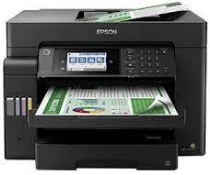
One of the basic features of the Epson L15150 printer model is its PrecisionCore print head that comprises 800 nozzles for black and 256 nozzles for color printing. Moreover, it also has a minimum ink droplet size of not more than 3.8 picolitres (pl). In terms of ink technology, pigment ink can print color and black documents conveniently. This Epson L15150 also has an internal driver to carry out duplex printing and run various OS versions.
Epson L15150 Drivers for Windows
Epson L15150 Drivers for macOS
Specifications
It can print, copy, and scan documents with high quality and speed output as a multifunctional printer. The optimum print resolution that users can obtain from the Epson L15150 model is up to 4800 x 2400 dots per inch (dpi). Also, standard printing with this device has an average speed of 32 pages per minute (ppm) for monochrome or black and white documents. On the other hand, color printing has 22 ppm while the average paperweight is 75 gsm.
Meanwhile, when printing at the ISO/IEC 24734 print standard, the rates are quite different. For instance, monochrome printing is now 25 ppm while color printing is 12 ppm. In contrast, duplex printing speed is about 16 ppm for monochrome and nine ppm for color. In terms of the first page out time, black and white documents take 5.5 seconds while color documents take 8.5 seconds. Scanning with this device has a rate of 26 images per minute (ipm) with the ADF component in a single-sided scanning mode for black documents.
And the rate for the single-sided color scan is about nine ipm with ADF scan and 10 seconds with flatbed scan. On the other hand, double-sided black document scanning with an A4 paper has a work rate of 11.5 ipm with the ADF scanner. And the double-sided scan speed for the color document is six ipm with an ADF scan.
Technical Details
| Title | Epson L15150 Drivers |
|---|---|
| Version | Varies with device |
| Requirements |
|
| Language | English |
| License | Free |
| Manufacturer | Seiko Epson Corporation |