
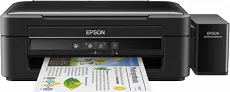
The Epson EcoTank L382 printer model uses the Epson Micro Piezo print head to produce an exquisite output quality. Its print system also has a nozzle configuration that includes 180 nozzles for black document printing. Besides, there are also 59 nozzles for color printing. Simultaneously, the minimum ink droplet size is up to 3 picolitres (pl) with a variable-sized ink droplet technology. At the same time, it has dye ink technology.
Epson EcoTank L382 Driver for Windows
Driver and Software for Mac OS
Specifications
The machine also produces a maximum print resolution of up to 5760 x 1440 dots per inch (dpi). It also has an all-in-one function that includes printing, scanning, and copying documents. As an office and home equipment, the Epson EcoTank L382 device is suitable for use in a wide range of environments. It produces the output documents in two different modes: the ordinary and ISO/IEC standard modes.
The latter mode’s print speed is up to 10 pages per minute (ppm) for black and white or monochrome documents. However, color documents at this same model have a print rate of 5ppm. The color printing rate is about 15 ppm for plain paper with an average paperweight of 75 gsm at the normal print mode. However, monochrome or black and white documents print at 33 ppm with the same paper type and weight.
Since this machine is a multifunction device, it can scan with the contact image sensor (CIS) scanner type. Also, it works with formats that include BMP, TIFF, JPEG, and PDF. Also, the scan speed mostly depends on the resolution. For instance, when at 300 dpi mode, black document scan at the rate of 2.4 milliseconds per line. On the other hand, at the 600 dpi mode, the scan speed is 7.2 milliseconds per line for black documents. Download Epson EcoTank L382 driver from Epson website