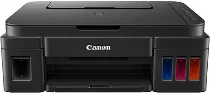
Printing with the Canon PIXMA G3202 requires its driver for optimum performance. For example, the print speed for 4×6 photo paper is approximately 60 seconds for the borderless print mode. Moreover, Black document printing has an ESAT rate of 8.8 images per minute (ipm). Color printing has an ESAT rate of 5.0 ipm. It also works with up to 1472 nozzles, including 1152 nozzles for color and 32 nozzles for pigment black printing.
Canon PIXMA G3202 Driver for Windows
Supported OS: Windows 11 (64-bit), Windows 10 (32-bit), Windows 10 (64-bit), Windows 8.1 (32-bit), Windows 8.1 (64-bit), Windows 8 (32-bit), Windows 8 (64-bit), Windows 7 (32-bit), Windows 7 (64-bit), Windows Vista (32-bit), Windows Vista (64-bit), Windows XP (32-bit)
Full Driver and Software Package for Windows 32-bit and 64-bit(Recommended)
Supported OS:Windows 11, 10, 8.1, 8, 7, Vista, XP 32-bit and 64-bit
48.16 MB
MP Drivers for Windows 32-bit and 64-bit
Supported OS:Windows 11, 10, 8.1, 8, 7, Vista, XP 32-bit and 64-bit
36.91 MB
XPS Printer Driver for Windows 32-bit and 64-bit
Supported OS:Windows 11, 10, 8.1, 8, 7, Vista 32-bit and 64-bit
18.59 MB
Printers and Multifunction Printers security patch for Windows 32-bit and 64-bit
Supported OS:Windows 11, 10, 8.1 32-bit and 64-bit
42.41 KB
Printers and Multifunction Printers security patch for Windows 32-bit and 64-bit
Supported OS:Windows 7 32-bit and 64-bit
42.41 KB
Driver and Software for Mac OS
Supported OS: macOS Sonoma 14, macOS Ventura 13, macOS Monterey 12, macOS Big Sur 11, macOS Catalina 10.15, macOS Mojave 10.14, macOS High Sierra 10.13, macOS Sierra 10.12, OS X El Capitan 10.11, OS X Yosemite 10.10, OS X Mavericks 10.9, OS X Mountain Lion 10.8, OS X Lion 10.7
Full Driver and Software Package for macOS
Supported OS:macOS 10.10 to 10.15
10.51 MB
Full Driver and Software Package for macOS
Supported OS:macOS 10.7 to 10.9
7.53 MB
CUPS Printer Driver for macOS
Supported OS:macOS 11 to 14
15.91 MB
CUPS Printer Driver for macOS
Supported OS:macOS 10.7 to 12
14.52 MB
ICA Driver for macOS
Supported OS:macOS 13, 14
3.48 MB
ICA Driver for macOS
Supported OS:macOS 11, 12
3.48 MB
ICA Driver for macOS
Supported OS:macOS 10.7 to 10.15
2.27 MB
Driver for Linux
Supported OS: Linux (32-bit), Linux (64-bit)
IJ Printer Driver for Linux
Supported OS:Linux
659.39 KB
IJ Printer Driver for Linux
Supported OS:Linux
287.77 KB
IJ Printer Driver for Linux
Supported OS:Linux
476.65 KB
ScanGear MP for Linux
Supported OS:Linux
235.86 KB
ScanGear MP for Linux
Supported OS:Linux
212.62 KB
ScanGear MP for Linux
Supported OS:Linux
204.40 KB
Also, the print resolution is up to 4800 x 1200 dots per inch (dpi) under ideal conditions. Similarly, the ink compatibility depends on the ink type, with options including GI-290 BK pigment black ink and GI-290 C/M/Y dye-based inks. The black ink cartridge has a maximum volume of 12=35 ml, while the color ink has 70.0 ml. Also, the compatible paper sizes includes 4 x 6 inches, 5 x 5 square inches, 5 x 7, 8 x 10, legal, letter, US #10 envelopes.
The compatible paper types include plain paper, high-resolution canon paper, photo paper plus glossy II, and photo paper glossy papers. Canon PIXMA G3202 also supports photo paper, semi-gloss, pro luster, matte photo paper, and US # envelopes. Some notable printer features include the auto photo fix, borderless printing, business card printing, Canon PRINT app, and document printing. The others have easy photo print+, full HD movie print, Google Cloud Print, and high paper yield.
Other peculiar features are my image garden, photo printing, PIXMA cloud link, red-eye correction, and quiet mode functioning. In copying, the speed is up to the first copy out time is 24 seconds for a standard document. Meanwhile, the scanning type has a flatbed feature and a contact image sensor (CIS) element. Also, the maximum resolution for optical printing is 600 x 1200 dpi for optical resolution. But the interpolated resolution is up to 19200 x 19200 dpi. Download Canon PIXMA G3202 driver from Canon website.
