
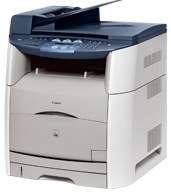
The first attribute to learn about the Canon i-SENSYS MF8180C printer model is its multifunction printer. The multiple functions include printing, copying, scanning, and faxing documents at optimum quality. Concerning the speed, the Canon i-SENSYS MF8180C model can print color documents at four pages per minute (ppm) on A4 paper. On the other hand, black and white printing on the same A4 paper will run at a rate of 19 ppm.
Canon i-SENSYS MF 8180C driver Downloads for Microsoft Windows 32-bit – 64-bit and Macintosh Operating System.
Supported Toner Cartridges
701 Cyan Toner Cartridge : Yields upto 4000 Pages
Black 701 Toner Cartridge : Upto 5000 Pages
Toner Cartridge Yellow 701 : Yields upto 4000 Pages
Toner Cartridge 701 Magenta : Yields approx 4000 Pages
Canon i-SENSYS MF8180C Driver for Windows
Driver and Software for Mac OS
Specifications
This machine can boast of the color laser-beam print technology with an average print resolution of 600 x 600 dots per inch (dpi). However, the maximum from the machine is up to 2400 x 600 dpi. This full resolution is attainable through the aid of an automatic image refinement (AIR) component. In comparison, the machine supports the CARPS print language and features the toner saver mode for economical printing.
Under copying, the machine can run at the same rate as printing. But the first copy out time is up to 21 seconds or less for monochrome documents. Besides, the first copy out page time is about 45 seconds for color documents. Copying with this machine has a standard output quality of 600 x 600 dpi. This rate affects the text, photo, and a combination of the two types. Copying also supports multiple copies of up to 99 copies from one original document.
In scanning, the optical resolution is up to 1200 x 2400 dots per inch (dpi). At the same time, the enhanced reaches up to 9600 x 9600 dpi. Color scanning depth is about 48 bit/24 bit for input and output levels. This mode is also compatible with TWAIN and WIA protocols and a maximum scan width of 216 mm. Canon i-SENSYS MF8180C model also has a faxing feature with a super G3 processor that can run at 33.6 kbps.